1. Detection (탐지)
AWS GuardDuty
로그 기반으로 이상 탐지되었을 때 알림 가능. EventBridge로 이벤트 발행해서 이런저런 서비스들과 연동해 자동으로 조치 가능
DNS Based findings를 못 하면 DNS를 AWS가 제공하는 기본 DNS Resolver (Route 53 VPC Resolver)를 사용하고 있는지 확인해야 함. Open DNS, Google DNS, 혹은 자체 DNS를 사용하면 DNS Based findings 못 씀
이런저런 서비스에 다 붙어서 작동한다. EC2나 EKS나 람다 등등
Q) A company recently enabled Amazon GuardDuty and has begun receiving a large number of findings that originate from internal IP addresses. After investigation, a security engineer confirms that these IP addresses are trusted and should not generate GuardDuty findings. The security engineer needs to configure GuardDuty so that activity from these trusted IP addresses no longer produces findings.
Which combination of actions should the security engineer take? (Select two)
A) Create a plaintext file that lists the trusted IP addresses in the required GuardDuty format A) Upload the trusted IP file to an Amazon S3 bucket, and configure a trusted IP list in GuardDuty that points to that file
S3에 trusted IP list 파일 넣고 GuardDuty가 읽게 할 수 있다. 파일 형태에 json은 없음
- Plaintext (txt)
- Structured Threat Information Expression (STIX), xml 형태다
- Open Threat Exchange (OTX)TM CSV
- FireEyeTM iSIGHT Threat Intelligence CSV
- ProofpointTM ET Intelligence Feed CSV
- AlienVaultTM Reputation Feed, 뭔가 이상한 포맷
192.0.2.1#4#2#Malicious Host#KR##37.5111999512,126.974098206#3 192.0.2.2#4#2#Scanning Host#IN#Gurgaon#28.4666996002,77.0333023071#3 192.0.2.3#4#2##CN#Guangzhou#23.1166992188,113.25#3
AWS Security Hub
여러 계정을 넘나들면서 자동으로 security check를 해줌. 보안 관련 여러 AWS 서비스와 AWS 파트너 도구들과 연동해서 결과 모아서 보여줌
AWS Config가 활성화 되어있어야 동작함
GuardDuty는 runtime에 발생하는 이상 동작을 탐지한다면, Security Hub는 보안 취약점이 발생할 수 있는 AWS 설정을 찾아서 알려줌.
마찬가지로 뭔가를 탐지하면 EventBridge를 통해 이벤트를 발행해서 이런저런 자동화를 할 수 있음
AWS Config는 리소스 설정 상태와 규칙 준수 여부를 기록/평가하는 기반, Security Hub는 그 결과를 포함해 더 넓은 보안 신호를 종합해서 보여주는 상위 레이어입니다. 실제로 Security Hub의 많은 컨트롤은 AWS Config rules를 사용해 보안 점검을 수행하고 findings를 생성하므로, Security Hub가 AWS Config를 활용하긴 하지만, Security Hub 자체가 “Config 결과를 모아보기 위한 서비스”라고 보긴 어렵습니다.
실무적으로는 이렇게 구분하면 됩니다.
- 리소스 인벤토리 / 설정 변경 / Config rule 준수 상태를 중앙 조회하고 싶다 → AWS Config Aggregator
- 보안 관점에서 어떤 계정/리전에 어떤 위험 finding이 있는지, 보안 표준 위반이 무엇인지 한 번에 보고 싶다 → Security Hub
한 줄로 말하면:
Config Aggregator는 “설정/준수 데이터의 중앙 조회”, Security Hub는 “보안 posture와 findings의 중앙 관리” 입니다.
Amazon Detective
보안 관련 문제, 혹은 가능성이 발견되었을 때 근본 원인을 찾아주는 서비스
이슈의 상세정보에 대한 통합된 view를 제공한다.
최대 1년치 데이터를 모아서 분석할 수 있음
Amazon Detective Investigation → IAM 유저나 role이 어떤 보안 사고에 연관되었는지 보여줌
Amazon Insepctor
EC2 Instance, Container Images, Lambda Functions 취약점 있는 이미지나 OS, 소프트웨어 사용하고 있는지만 검사함
EC2는 AWS System Manager (SSM) agent를 통해 동작함. 의도하지 않은 네트워크 접근가능성(unintended network accessibility)이 있는지도 파악 가능
CloudWatch
Unifined CloudWatch Agent
이 agent가 ec2에 설치되어 있어야 RAM, processes, used disk space 같은 추가 로그가 CloudWatch에 전송됨.
agent 설정은 SSM Parameter Store을 통해 한 곳에서 설정할 수 있음
Unified CloudWatch Agent를 통해 수집된 metrics의 기본 namespace는 CWAgent
procstat plugin으로 프로세스 모니터링 가능
CloudWatch Logs
로그 그룹: 애플리케이션 단위 로그 스트림: 애플리케이션 내의 인스턴스, 로그 파일, 컨테이너 등의 단위
CloudWatch Logs Insights
쿼리 작성해서 로그 검색 가능
CloudWatch S3 Export
로그가 s3 export가 가능해질 때까지 최대 12시간 걸림 realtime, near-realtime을 기대하고 사용하는거 아니다.
CloudWatch Logs Subscriptions
real-time으로 로그 받아보고 싶을 때
Kinesis Data Streams, Kinesis Data Firehose, Lambda 등으로 로그 구독 가능
Kinesis Data Firehose는 OpenSearch나 S3에 연결 가능. 소방호스처럼 데이터를 쭉쭉 전달하기만 함. Kinesis Data Streams는 온갖군데에 연결 가능 (KDF, KDA, EC2, Lambda…)
여러 account의 로그를 CloudWatch Logs Subscriptions를 통해 Kinesis Data Stream에 모으고, 그 Stream을 Kinesis Data Firehose가 받아서 S3에 저장하는 구조 가능
Kinesis Data Firehose와 Kinesis Data Stream 차이
- Amazon Kinesis Data Streams (KDS)
실시간 이벤트를 스트림에 저장해 두고, 여러 소비자가 그 데이터를 읽어 가는 서비스야. 스트림은 shard로 구성되고, 소비자 애플리케이션이 데이터를 처리하는 구조다. 기본적으로는 소비자가 읽어 가는 모델이고, 여러 소비자가 같은 스트림을 병렬로 읽을 수 있다. - Amazon Data Firehose
실시간 데이터를 받아서 S3, Redshift, OpenSearch, HTTP endpoint 같은 목적지로 전달(delivery) 해주는 서비스야. 중간에 버퍼링, 배치, 일부 변환(Lambda), 포맷 변환 등을 해주고, 운영 부담이 적은 “전달 파이프라인”에 가깝다.
그래서 네 표현을 조금 다듬으면:
- Firehose = 데이터를 목적지로 보내주는 관리형 파이프라인
- Data Streams = 애플리케이션이 읽어서 직접 처리하는 이벤트 로그/스트림 저장소
라고 보면 가장 실무 감각에 맞아.
다만 **“Data Stream은 사용하는 쪽에서 땡겨간다”**는 말은 절반만 맞아.
기본 소비 모델은 맞게 이해한 거야. 소비자가 스트림에서 읽는다. 그런데 Kinesis Data Streams에는 Enhanced Fan-Out이라는 기능이 있어서, 이 경우에는 Kinesis가 등록된 consumer에게 데이터를 더 직접적으로 전달하는 형태로 동작한다. AWS 문서도 이 경우를 “pushes data records”라고 설명해. Lambda가 Kinesis를 이벤트 소스로 읽을 때도 이 모델을 활용할 수 있다.
반대로 Firehose는 여러 소비자가 같은 데이터를 제각각 읽는 용도는 아니야. Firehose의 핵심은 “읽기 인터페이스를 열어놓는 것”이 아니라, 데이터를 받아서 버퍼링 후 목적지에 적재하는 거다. 예를 들어 S3에 파일로 떨구거나, Redshift/OpenSearch로 보내는 식이지.
또 하나 중요한 점은, 둘이 완전히 별개만은 아니라는 거야.
Firehose는 Kinesis Data Streams를 소스로 사용할 수 있다. 이 경우 producer는 Kinesis Data Streams에 쓰고, Firehose가 그 스트림에서 읽어서 최종 목적지로 적재한다. 즉, KDS + Firehose 조합도 흔하다.
실무적으로는 이렇게 고르면 돼:
- 여러 consumer가 각자 실시간 처리해야 한다
→ Kinesis Data Streams - S3/Redshift/OpenSearch 같은 곳으로 적재가 목적이고, 운영을 단순화하고 싶다
→ Data Firehose - 한 번은 앱들이 실시간 처리하고, 동시에 데이터 레이크에도 쌓고 싶다
→ Kinesis Data Streams + Firehose 조합
한 줄로 요약하면:
Data Streams는 “스트리밍 데이터를 보관하고 소비자가 처리하게 하는 서비스”이고, Firehose는 “그 데이터를 어딘가로 전달해 적재하는 서비스”다.
CloudWatch - Contributor Insights
누가 가장 많은 문제를 발생하는지 찾아줌
bad host, the heaviest network users, URLs that generate the most errors 등등
Amazon EventBridge
뭔지 알지?
cron, event pattern(뭔가 이벤트가 발생했을 때 실행됨)
람다 호출, SQS/SNS 메시지 발행 등등.. 가능. 엄청 많네 Lambda, AWS Batch, ECS Task, SQS, SNS, Kinesis Data Streams, Step Functions, CodePipeline, CodeBuild, SSM, EC2 Actions
다른 AWS 계정이나 파트너 서비스(Datadog 같은) 혹은 커스텀 애플리케이션도 Event Bus를 통해 EventBridge 사용 가능. Resouce-based Policy
‘Schema Registry’ 기능을 통해서 임의의 json 데이터를 event bridge가 읽게 할 수 있음
Amazon Athena
‘analyze data in S3 using serverless SQL’ → use Athena
성능 향상
- columnar data (Apache Parquet or ORC)
- 압축 (bzip2, gzip 기타 등등)
- 파티셔닝
- s3://atehna-examples/flight/parquet/year=1991/month=1/day=1/
- 파일 하나의 크기가 크게 (128MB 이상)
Federated Query
S3뿐만 아니라 Lambda를 통해 여러 데이터소스에서 데이터를 조회해서 쿼리할 수 있다 (ElastiCache, DocumentDB, DynamoDB, Redshift, Aurora, SQL Server, MySQL, Database on-premises, HBase in EMR 등등)
AWS CloudTrail
거버넌스, 컴플라이언스, 감사(audit) 제공
누가 뭘하는지 다 보인다
SDK, CLI, Console, IAM Users & IAM Roles의 행위들이 CloudTrail에 남음
Data events는 기본으로 꺼져있다 양이 너무 커서.
- S3 object-leve activity (ex: GetObject, DeleteObject, PutObject)
- AWS Lambda function execution activity (the Invoke API)
CloudTrail은 real-time 아님. 최대 15분 지연. S3에 로그 쌓는것도 매 5분마다 모아서 보냄
CloudTrail에서 Athena용 table을 만들 수 있음.
CloudTrail Insights
unusual activity 탐지 가능 평소 패턴 분석해서 baseline 만들고, 주기적으로 분석해서 unusual pattern 감지 EventBridge event 생성되어서 continuously analyzes
CloudTrail Lake
managed data lake
- CloudTrail Events
- CloudTrail Insights Event
- AWS Config Configuration Items
- AWS Audit Manager
- 3rd party events
모두 모아서 SQL query language로 조회 가능
immutable storage, 최대 10년 보관
Dashboard도 제공 가능
CloudTrail - Log File Integrity Validation
1시간마다 로그파일마다 digest file(hash)를 만들어서 로그파일이 변조되진 않았는지 확인 가능
AWS Macie
머신러닝과 패턴매칭으로 민감 데이터(sensitive data) 찾아줌. fully managed data security and data privacy service
S3에서 PII(Personally Identifiable Information) 같은거 찾아주고 alert 해줌
Managed Data Identifier
- Credit Card Numbers
- AWS Credentials
- Bank Accounts
규칙 추가해서 Custom Data Identifier 추가 가능
Allow List도 추가 가능
- Policy Findings
- IAM 정책 취약한거 찾아줌
- Sensitive Data Findings
- S3에서 민감 데이터 찾아줌
여러 계정 통합해서 Macie 사용 가능
VPC Flow Logs
로그에 이런저런 데이터 포함되어 있고, 해당 행위가 승인되었는지(ACCEPT) 거절되었는지(REJECT)도 남음
S3에 저장해서 Athena로 조회할 수도 있고 CloudWatch Logs에 넣어서 CloudWatch Logs Insights로 조회할수도 있다.
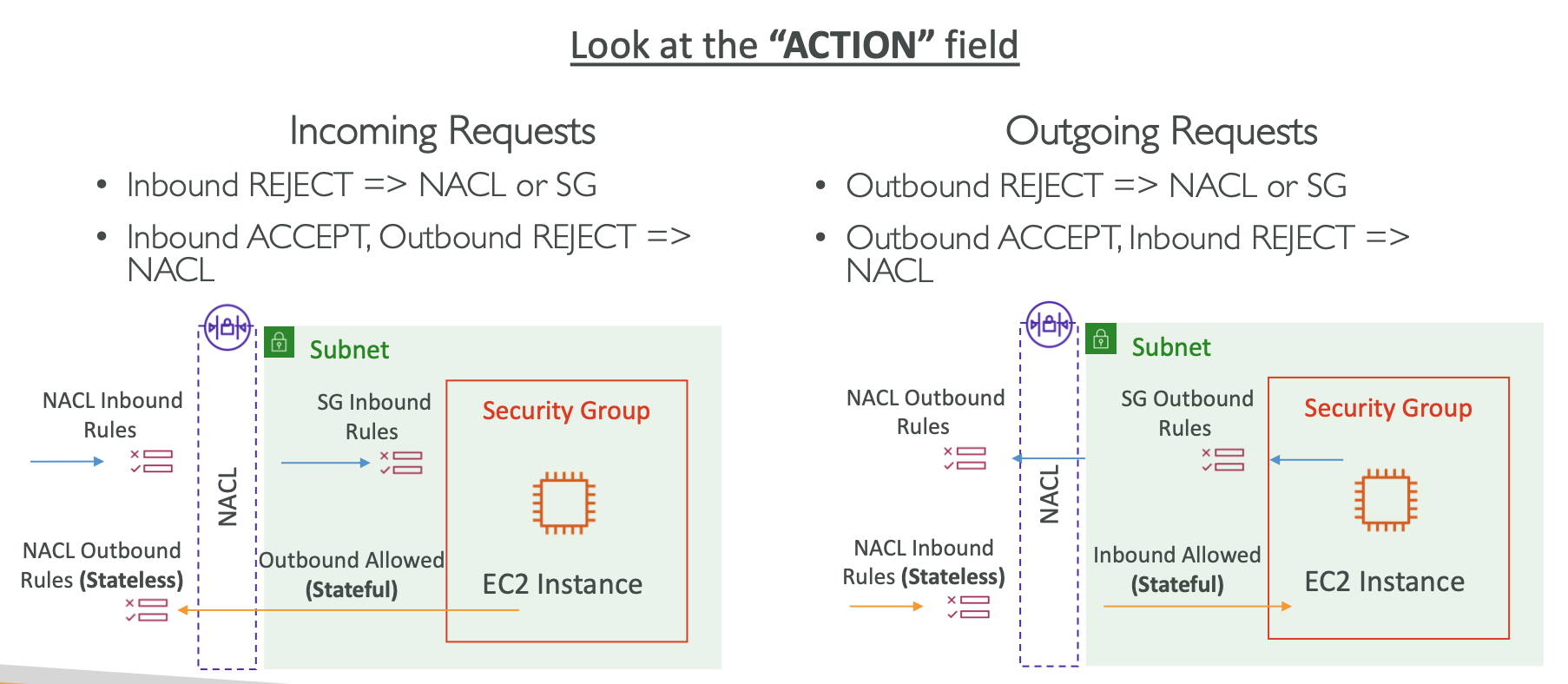
이런저런 경우에는 트래픽 capture 안 함
- 기본 Amazon DNS server를 사용하는 경우 (custom DNS traffic은 로그 남김)
- Amazon Windows license activation
- 169.254.169.254 for EC2 instance metadata
- 169.254.169.123 for Amazon Time Sync Service
- DHCP traffic
- Mirrored traffic
- Traffic to the VPC router reserved IP address (e.g., 10.0.0.1)
- Traffic between VPC Endpoint ENI and Network Load Balancer ENI
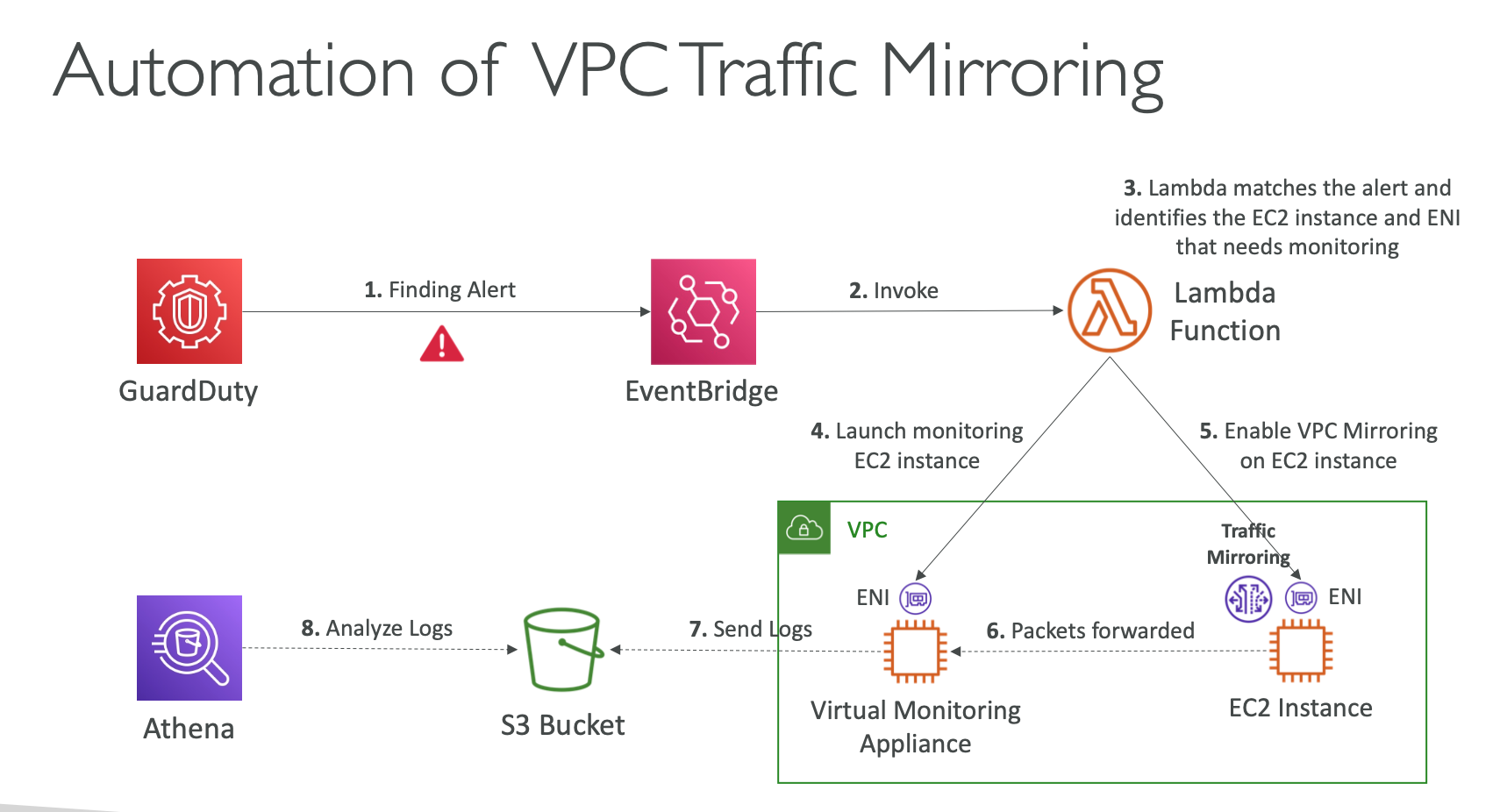
VPC는 Traffic Mirroring을 사용해서 VPC 트래픽 흐름을 분석할 수 있음.
특정 Source들의 VPC Traffic을 Mirroring을 통해 분석용 애플리케이션등에 보낼 수 있다.
Transit Gateway 등을 사용해서 여러 계정의 VPC Traffic을 한 곳에 모아서 분석할 수 있음.
아래처럼 Guard Duty가 문제를 발견했을 때 자동으로 Mirroring을 설정하고 트래픽 로그를 S3에 넣어서 분석하는 형태도 가능.
VPC Flow Logs는 네트워크 인터페이스 기준으로 트래픽을 기록하므로, PrivateLink 관련 ENI/NLB 주변에서 실제 패킷이 어디까지 가고 어디서 드롭되는지 파악하는 데 적합합니다.
VPC Network Access Analyzer
이름 그대로. VPC의 네트워크에 뭔가 문제가 있는지 분석해주는 도구
Route 53 - DNS Query Logging
public에서 오는 DNS queries를 로깅할 수 있다. Only for Public Hosted Zones
CloudWatch Logs에만 로그를 보낼 수 있음
Route 53 - Resolver Query Logging
VPC 내부에서 발생한 모든 DNS queries에 대한 로그를 남김
이건 데이터 여러군데에 보낼 수 있음
- CloudWatch logs
- S3
- Kinesis Data Firehose
Amazon OpenSearch Service
Amazon ElastiSearch의 계승
Public Access로 해놓고 아래 도구로 접근 제한 가능
- Access Policies
- Identity-based Policies
- IP-based Policies
VPC Access로 VPC 내부에서만 접근하게도 가능
아래 2개로 접근 제한 가능
- Access Policies
- Identity-based Policies
Subnet, Security Group, VPC Endpoints, ENI, VPN, Transit Gateway 등을 통해서 어쨌든 OpenSearch에 접근해야 사용 가능하다. 접근 자체를 못하면 사용도 못함.
2. Incident Response (사고 대응)
Penetration Testing
보안 테스트를 AWS 허락 안 맡고 테스트해도 되는 리소스들이 있고, AWS 허락 맡고 해야 하는 리소스들이 있다.
DNS 관련이나 DoS, DDoS 등 트래픽 관련된 건 사전에 AWS와 협의해야 함
DDoS는 테스트해볼 수 있는 AWS DDoS Test Partner가 있다.
Compromised Resources
어떤 리소스가 조작된 것으로 의심될 때 해야 하는 조치들 적혀있음
보통 격리 → 스냅샷 떠놓기 → 태깅하기 로 되어있음
EC2, S3, ECS Cluster, Standalone Container, RDS, Credentials, IAM Role, Account
Guard Duty가 조작된 것으로 의심될 때 알려줌
EC2 Instance Connect. Browser Based SSH
OS에 EC2 Instance Connect agent 깔려있으면 (Amazon Linux에 깔려있음) AWS Console이나 CLI로 쉘에 접속할 수 있다.
60초짜리 임시 public key를 인스턴스에 주입하고 그걸로 쉘 로그인 함.
key-pair 분실했다든지의 이유로 접근 못 할 때 활용할 수 있음
EC2 Serial Console
하드웨어의 Serial Console과 유사하게 OS에 직접 붙을 수 있음.
OS User와 Password가 셋팅되어 있어야 사용 가능하다.
기본적으로는 기능 꺼져있음.
Nitro-based EC2 인스턴스에만 사용 가능
Connect to Linux EC2 Instance with a Lost SSH Key Pair - Using EC2 User Data
EC2 User Data로 ssh-authorized-keys 속성에 public key를 주입하는 방식도 가능.
인스턴스 stop하고 user data 교체한 뒤에 start하는 방식
key 교체 완료되면 EC2 User Data 지우기
Connect to Linux EC2 Instance with a Lost SSH Key Pair - Using Systems Manager
AWSSupport-ResetAccess라는 Automation Document (SSM 기능) 사용해서 자동으로 key pair 교체 가능
SSM Agent 깔려있어야 함
Connect to Linux EC2 Instance with a Lost SSH Key Pair - Using EBS Volume Swap
이런것도 되네
Connect to Windows EC2 Instance with a Lost SSH Key Pair - Using EC2Launch v2
Windows에서 사용 가능
EC2Launch v2 service가 실행중일 때 사용 가능
이것도 EBS Volume을 swap하는 것과 마찬가지 방식
Volume을 분리해서 다른 인스턴스에 붙이고 아래 파일 제거한 뒤에 원래 인스턴스에 Volume 붙이고 실행하면 Password 재설정할 수 있다. %ProgramData%/Amazon/EC2Launch/state/.run-once
Connect to Windows EC2 Instance with a Lost SSH Key Pair - Using EC2Config
이것도 마찬가지로 windows에서 가능
EC2Config service가 실행중일 때 사용 가능
Program Files/Amazon/Ec2ConfigService/Settings/config.xml 위 파일에서 EC2SetPassword의 state를 Enabled로 변경해주면 된다.
마찬가지로 Volume 떼서 다른 인스턴스에 붙여서 변경해야 함.
Connect to Windows EC2 Instance with a Lost SSH Key Pair - Using EC2Launch
이것도 마찬가지로 윈도우에서 볼륨 떼서 어쩌구..
EC2 Rescue Tool for Windows Server를 설치하고 Reset Administrator Password를 하면 된다.
Connect to Windows EC2 Instance with a Lost SSH Key Pair - Using Systems Manager
SSM Agent가 깔려있어야 함. 아래 셋 중에 하나 방식 사용하면 됨.
- AWSSupport-RunEC2RescueForWindowsTool 이라는 Command Document (SSM 기능) 실행해서 대처 가능
- Command Document 실행하고 EC2Rescue Tool 설치해야 함
- AWSSupport-ResetAccess 라는 Command Document 실행해서 대처 가능
- AWS-RunPowerShellScript 라는 Run Command (SSM 기능)를 수동으로 실행하고 관리자 비밀번호 변경하기.
net user Administrator Password@123
EC2Rescue Tool
linux와 windows 모두 rescue tool이 있다.
네트워크 안 될 때나 운영체제 문제 있거나 로그인 안 되거나 로그 확인해야 할 때나 기타 등등의 경우에 쓸 수 있다.
AWS Abuse Report
해킹당한 것 같으면 AWS에 신고
AWS Trust & Safety Team 에서 먼저 감지해서 사용자에게 이메일 보낼 수도 있음. 24시간 안에 조치 안 하면 계정 정지됨
AWS Systems Manager
이런저런 기능 많다
EC2 Instance나 On-premise server/VM에 사용함
Resource Group
Tag로 Resource를 Group으로 묶어서 볼 수 있음
SSM Session Manager
겉으로 보면 EC2 Instance Connect와 SSM Session Manager 모두 “SSH key 없이 쉘 접속” 처럼 보이지만, 실제로는 방식이 꽤 다릅니다.
가장 큰 차이는 이겁니다:
EC2 Instance Connect는 본질적으로 SSH 접속을 더 편하게 해주는 기능입니다. 접속할 때 AWS가 인스턴스에 일시적인 SSH 공개키를 밀어 넣고, 그 키로 SSH 세션을 여는 방식입니다. 그래서 여전히 개념적으로는 SSH 기반 접속이고, 인스턴스에 SSH가 가능해야 하며 관련 네트워크 조건도 맞아야 합니다. AWS 문서도 EC2 Instance Connect 사용 시 네트워크 연결과 inbound SSH 허용이 필요하다고 설명합니다. 또한 콘솔에서 접속하려면 퍼블릭 IP가 필요하거나, 프라이빗 인스턴스라면 EC2 Instance Connect Endpoint 같은 구성이 필요합니다.
반면 SSM Session Manager는 SSH 자체를 쓰지 않아도 되는 관리 채널입니다. AWS Systems Manager의 기능으로, 브라우저 셸이나 CLI 세션을 통해 인스턴스에 접속합니다. AWS 공식 문서 기준으로 Session Manager는 inbound port를 열 필요가 없고, bastion host나 SSH key 관리도 필요 없습니다. 즉, 접속 경험은 “셸 접속”이지만, 기술적으로는 SSH 로그인이라기보다 SSM Agent를 통한 세션 연결에 가깝습니다.
EC2 Instance Connect
- SSH를 계속 쓰고 싶은 경우에 적합
22번 포트, 사용자 계정(ec2-user, ubuntu 등), SSH 데몬 개념이 그대로 중요- SSH 클라이언트 사용감이 익숙함
- 퍼블릭 접근 또는 EIC Endpoint 같은 네트워크 구성이 필요함
SSM Session Manager
- 운영/관리 용도로 더 많이 선호됨
- 인바운드 포트를 열지 않아도 됨
- 프라이빗 서브넷 인스턴스에도 잘 맞음
- EC2뿐 아니라 온프레미스 서버, VM까지 관리 대상이 될 수 있음
- 세션 로깅/감사 추적도 공식적으로 지원함
그래서 질문에 바로 답하면:
둘 다 “SSH key 없이 접속”처럼 보일 수는 있지만,
- EC2 Instance Connect = SSH 기반 접속을 AWS가 간편화한 것
- SSM Session Manager = SSH 없이도 되는 AWS 관리 세션
이라고 이해하면 거의 정확합니다.
운영 관점에서 보통은:
- 서버 운영/점검/감사 중심이면
SSM Session Manager - 진짜 SSH 접속 자체가 필요하거나 기존 SSH 워크플로를 유지해야 하면
EC2 Instance Connect
를 더 많이 씁니다.
Q) Which is the best solution to help you automatically revoke unused and expired IAM Access Keys?
A) AWS Config Remediation with SSM Automation Document
Selecting “AWS Config Remediation with SSM Automation Document” is correct because this solution allows for automated remediation of IAM Access Key issues by leveraging AWS Config to monitor compliance and triggering SSM Automation documents for revocation of unused or expired keys. This aligns with the objective of automating security best practices within AWS environments efficiently.
AWS Config Remediation이 알아서 감시하다가 SSM Automation Document를 실행해서 IAM Access Keys를 revoke 하는구나
3. Infrastructure Security
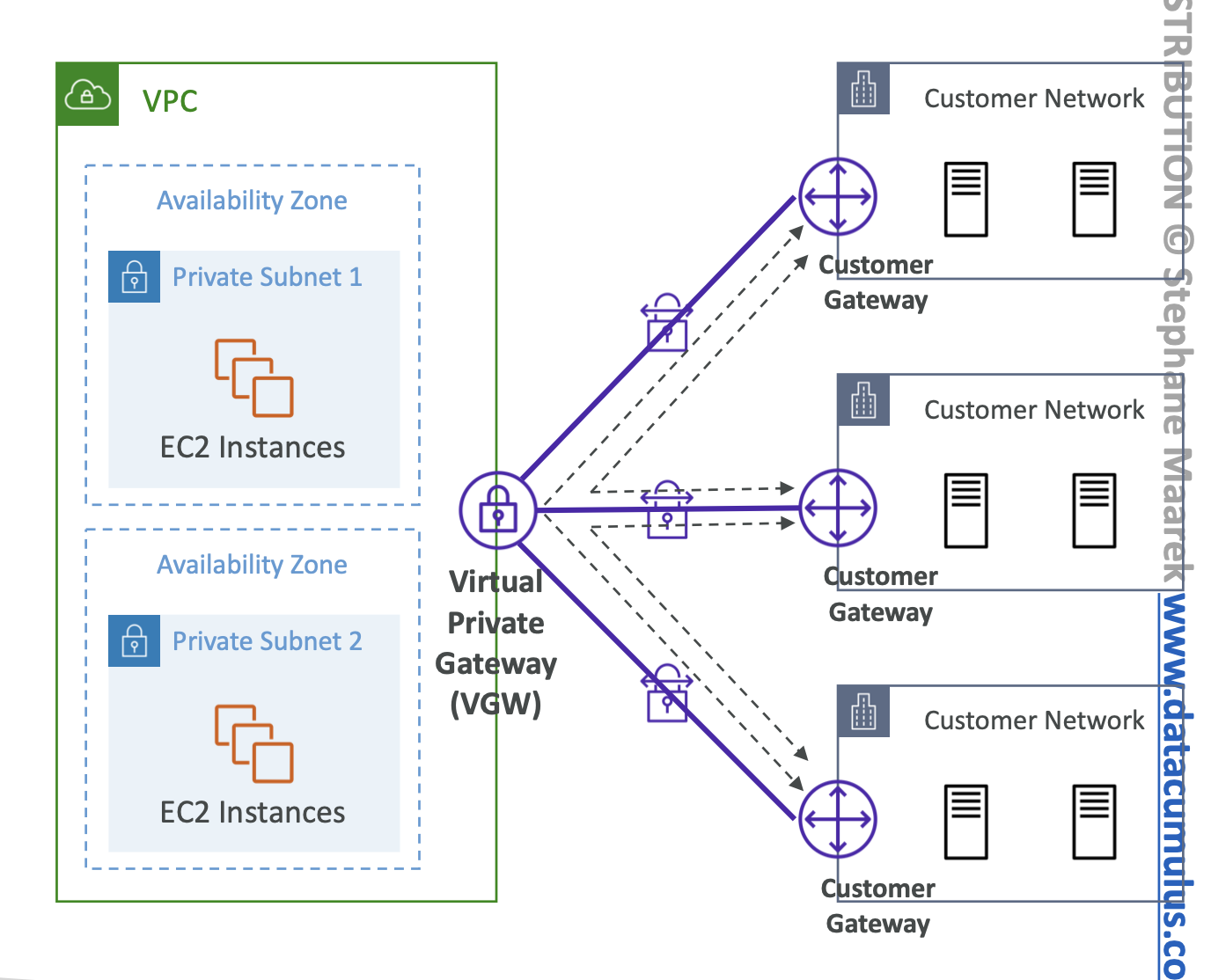
AWS Site-to-Site VPN
-
Virtual Private Gateway (VGW) VPC에 붙는 게이트웨이
-
Customer Gateway (CGW) On-premise에 붙는 게이트웨이
Important step: enable Route Propagation for the Virtual Private Gateway in the route table that is associated with your subnets.
AWS VPN CloudHub
여러 개의 네트워크망을 VPN을 통해 하나로 묶을 수 있음
AWS Client VPN
데스크탑, 랩탑 등 노트북에서 VPN을 통해 네트워크망에 붙을 수 있음
VPC Peering
- VPC Peering connection is NOT transitive (must be established for each VPC that need to communicate with one another)
- You must update route tables in each VPC’s subnets to ensure EC2 instances can communicate with each other
VPC Endpoints
Gateway와 Interface모두 VPC 내부의 리소스들이 외부망 노출 없이 AWS 서비스를 사용하기 위한 도구
VPC Endpoint Gateway는 S3와 DynamoDB만 사용한다.

SSM Session Manager로 Private Subnet의 EC2에 붙을 때도 VPC Endpoint 필요함
S3, DynamoDB도 VPC Endpoint Interface를 사용할 수는 있음
AWS Private Link
PrivateLink는 “저쪽 VPC/계정에 있는 특정 서비스를 내 VPC 안에 있는 것처럼 붙여 쓰는 것”
VPC Peering은 두 VPC를 서로 라우팅 가능하게 연결하는 것이며, Transit Gateway는 많은 VPC를 허브-앤-스포크 형태로 연결하는 중앙 허브입니다. 그래서 여러 VPC가 공통 서비스(예: 내부 API, 공통 인증 서비스, 공통 보안 서비스)를 소비하는 구조라면 PrivateLink가 잘 맞고, VPC끼리 서로 다양한 서브넷/리소스에 폭넓게 접근해야 하면 Peering이나 Transit Gateway가 더 적합한 경우가 많습니다.
PrivateLink를 쓰는 전형적인 상황은 이런 경우입니다.
내가 서비스 제공자이고, 특정 서비스를 NLB 뒤에 두고 여러 소비자 VPC에 노출하고 싶다. 이때 소비자 쪽은 Interface VPC Endpoint를 만들고, 제공자 쪽은 Endpoint Service를 공유합니다. AWS 문서에는 이런 endpoint service가 수천 개의 VPC에서 소비될 수 있다고 되어 있어서, “공통 서비스 하나를 많은 VPC에 배포 없이 붙이는 패턴”에 특히 잘 맞습니다.
NACL (Network Address Control List)
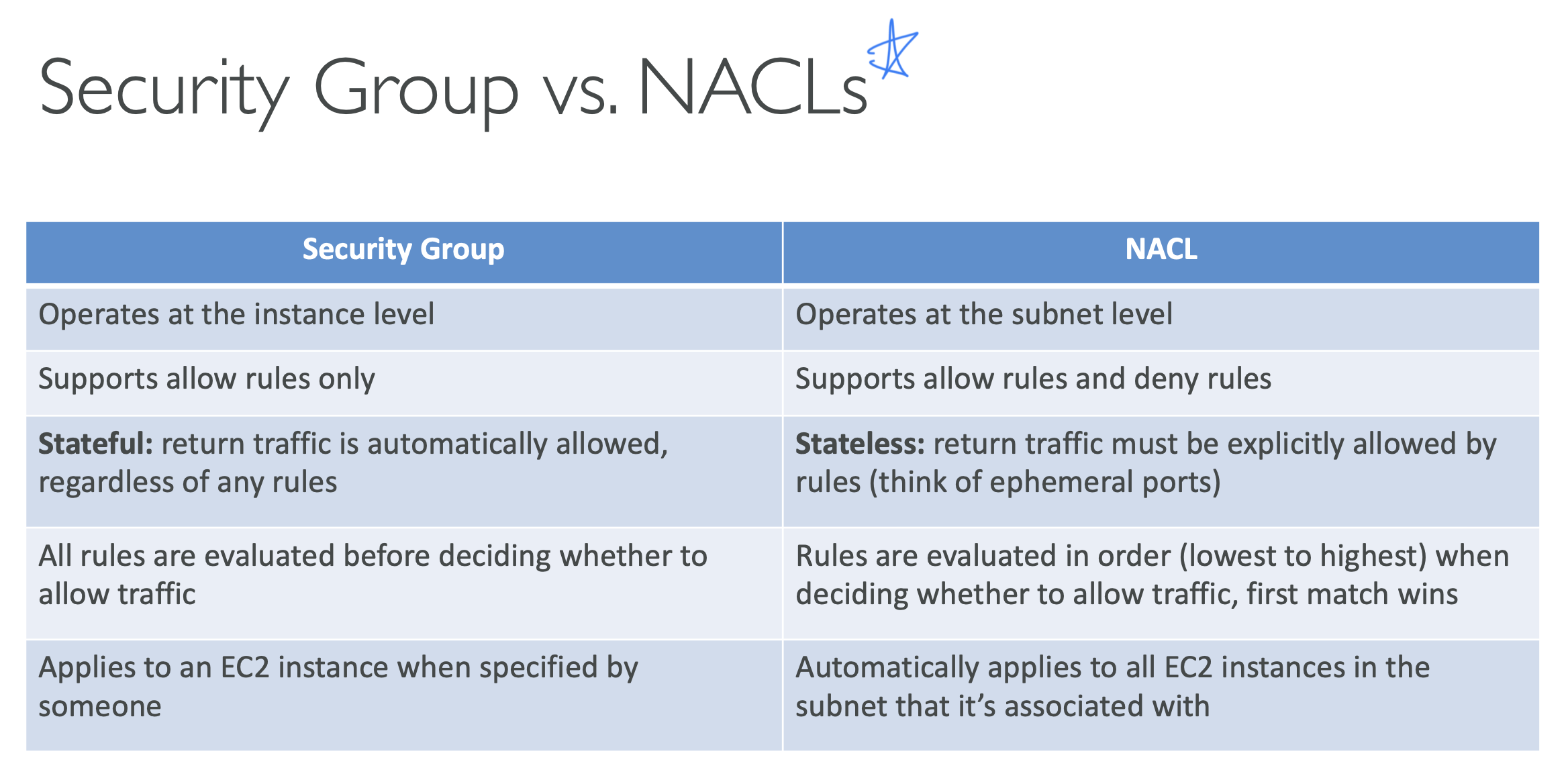
- One NACL per subnet, new subnets are assigned the Default NACL
- NACL are a great way of blocking a specific IP address at the subnet level
- Newly created NACLs will deny everything
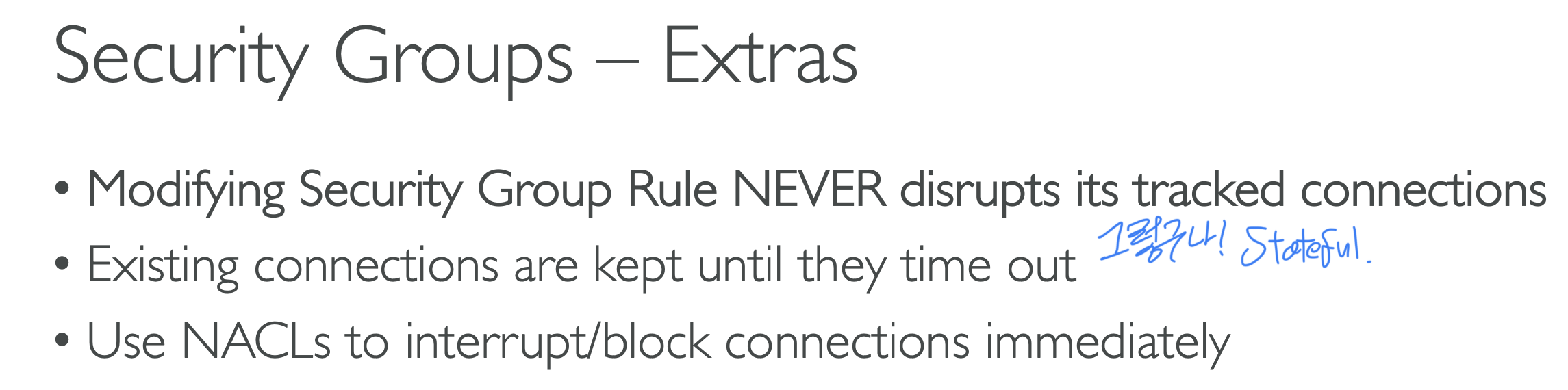
Transit Gateway
Transit Gateway의 IP Multicast는, 한 송신자가 보낸 하나의 데이터 스트림을 여러 수신자에게 동시에 전달할 수 있게 해주는 기능입니다. AWS에서는 Transit Gateway가 이때 멀티캐스트 라우터 역할을 하며, 연결된 VPC들의 서브넷 사이로 멀티캐스트 트래픽을 전달합니다.
쉽게 말하면:
- Unicast: 1대 → 1대
- Broadcast: 1대 → 같은 네트워크 전체
- Multicast: 1대 → “이 그룹에 가입한 애들만” 여러 대
Transit Gateway에서 이 기능을 쓰려면 보통 Multicast Domain을 만들고, 여기에 서브넷을 연결합니다. 그리고 실제 수신 대상은 그 서브넷 안의 ENI(EC2 네트워크 인터페이스) 단위로 멀티캐스트 그룹에 참여합니다. 즉, “TGW에 VPC를 많이 붙이기 위한 기능”이라기보다, 붙어 있는 VPC들 사이에서 1:N 전달을 효율적으로 하려는 기능에 가깝습니다.
Transit Gateway: Site-to-Site VPN ECMP
ECMP: Equal-cost multi-path routing
Direct Connect (DX)
-
Provides a dedicated private connection from a remote network to your VPC
-
Dedicated connection must be setup between your DC and AWS Direct Connect locations
-
Use Cases:
- Increase bandwidth throughput - working with large data sets – lower cost
- More consistent network experience - applications using real-time data feeds
- Hybrid Environments (on prem + cloud)
Direct Connect는 암호화를 제공하지 않음. 암호화가 필요하면 Direct Connect와 VPN을 함께 사용하면 된다.
Direct Connect Gateway
- If you want to setup a Direct Connect to one or more VPC in many different regions (same account), you must use a Direct Connect Gateway
CloudFront
Private Subnet에 있는 ALB를 CloudFront에 연결해서 ALB의 외부 노출 없이 CloudFront를 사용할 수 있구나
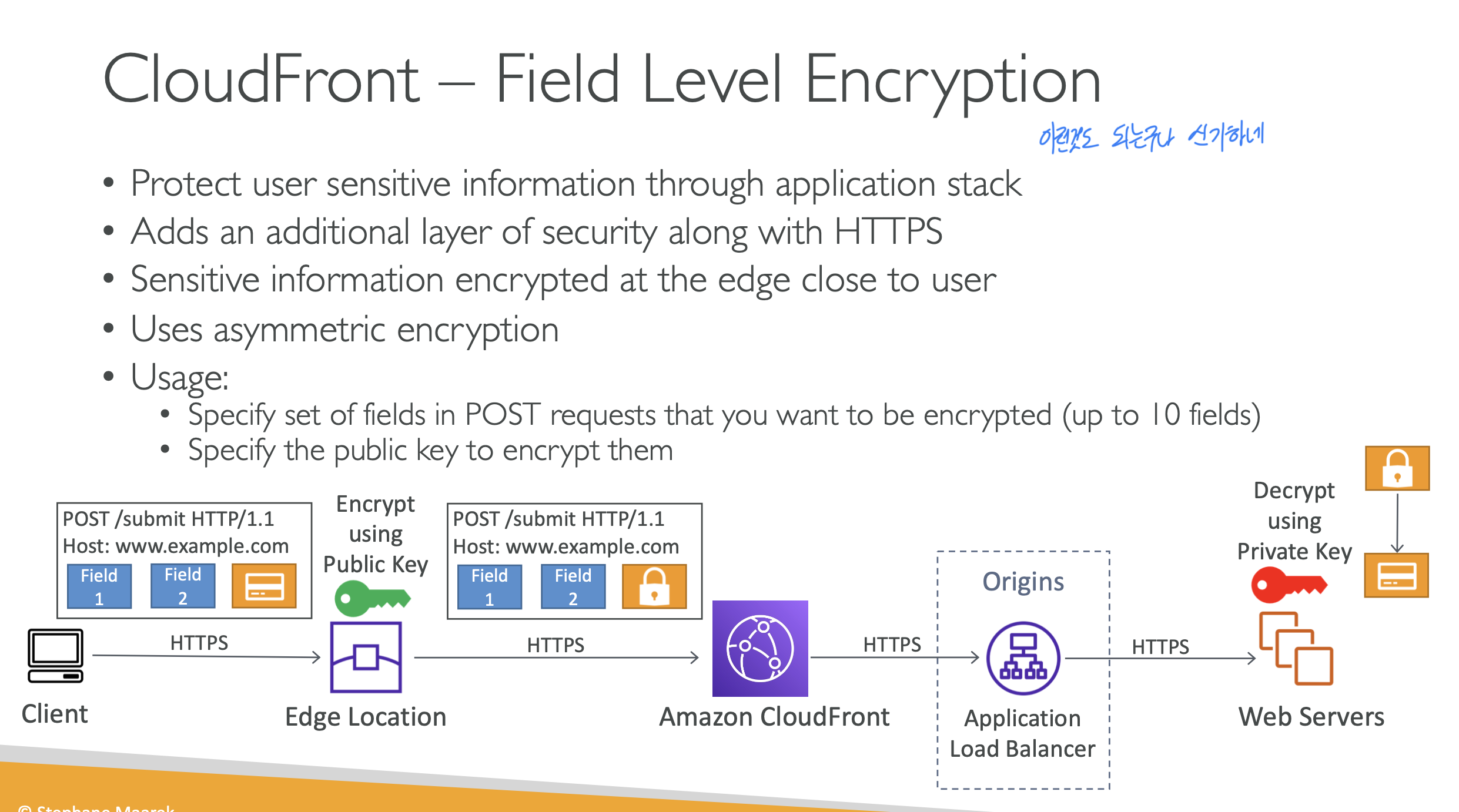
CloudFront – Field Level Encryption
CloudFront Edge Location에서 암호화하고 애플리케이션이 복호화 하는 방식.. 신기하네
POST 요청의 특정 필드만 암호화하는 방식. 최대 10개 필드까지.
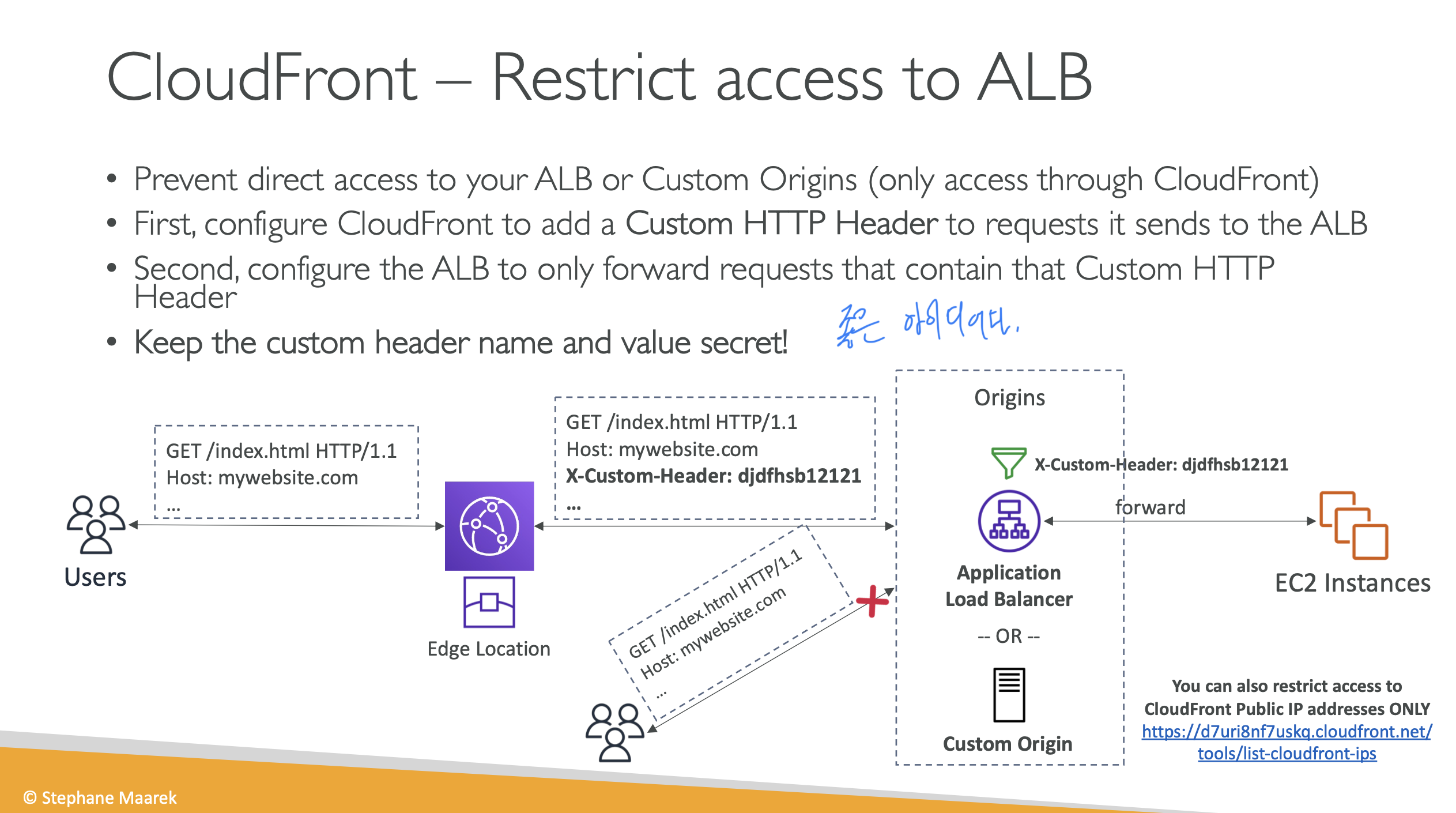
CloudFront – Restrict access to ALB
ALB가 Public 망에 있더라도 CloudFront에서 특정 헤더를 붙여서 ALB에 전송하는 식으로 CloudFront만 ALB를 사용하게 할 수 있음
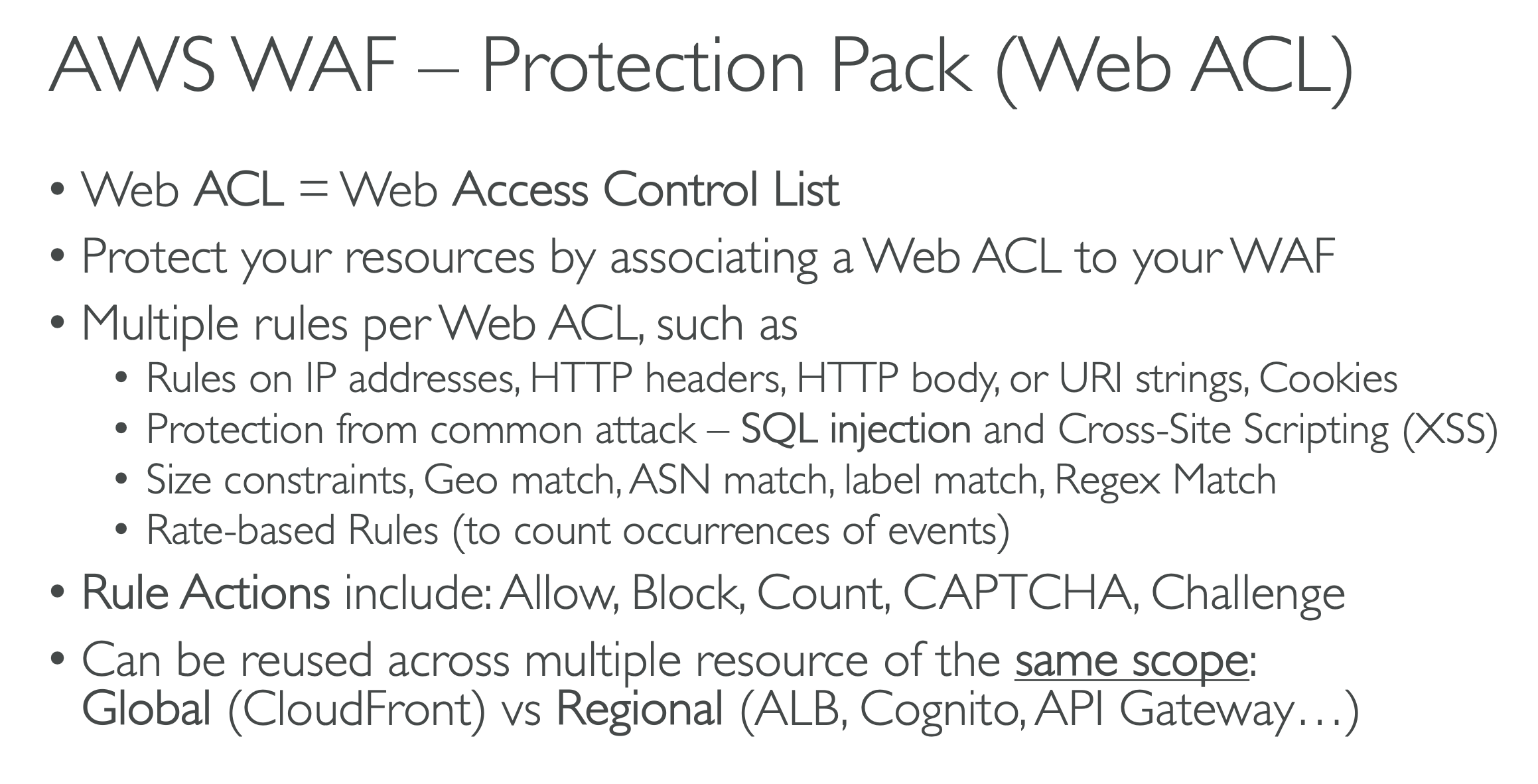
AWS WAF
애플리케이션 레이어(Layer 7)에서 작동하는 방화벽
AWS Shield
DDoS 방어
AWS Firewall Manager
AWS Organization 사용하면서 방화벽 관련 설정 한 곳에서 관리하고 싶을 때 사용
AWS Artifact
감사, 컴플라이언스등에 활용할 수 있는 문서들 모음
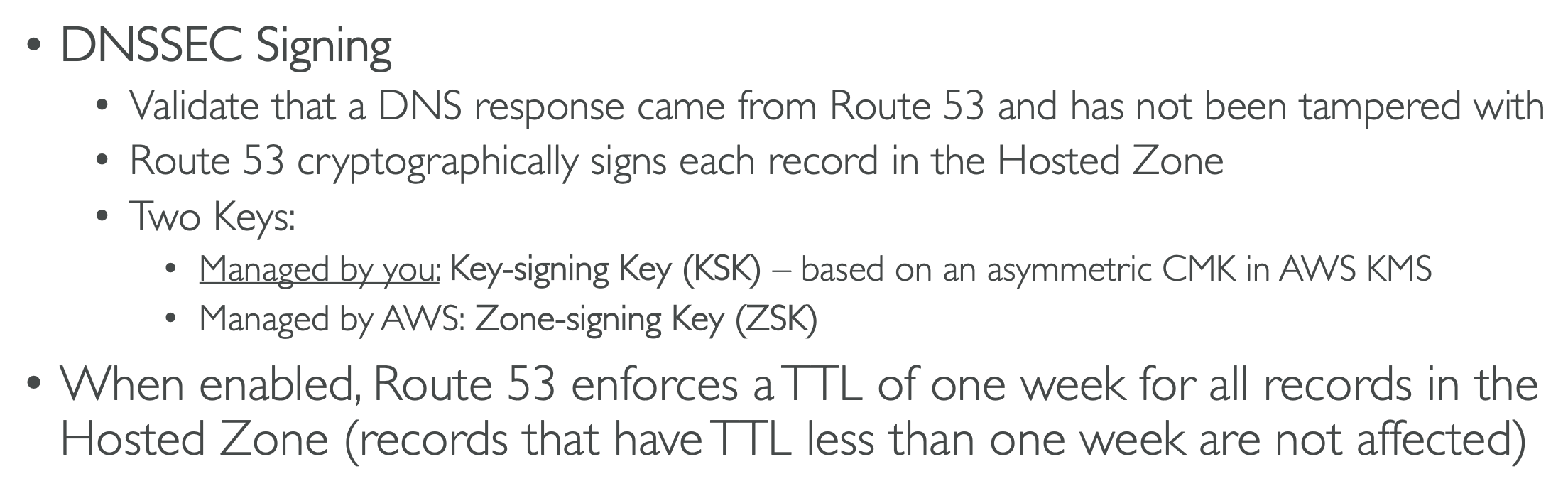
Route 53 – DNS Security Extensions (DNSSEC)
DNS 변조되었는지 탐지
AWS Network Firewall
VPC 전체를 보호할 수 있음. Layer 3 ~ Layer 7
- Any direction, you can inspect
- VPC to VPC traffic
- Outbound to internet
- Inbound from internet
- To / from Direct Connect & Site-to-Site VPN
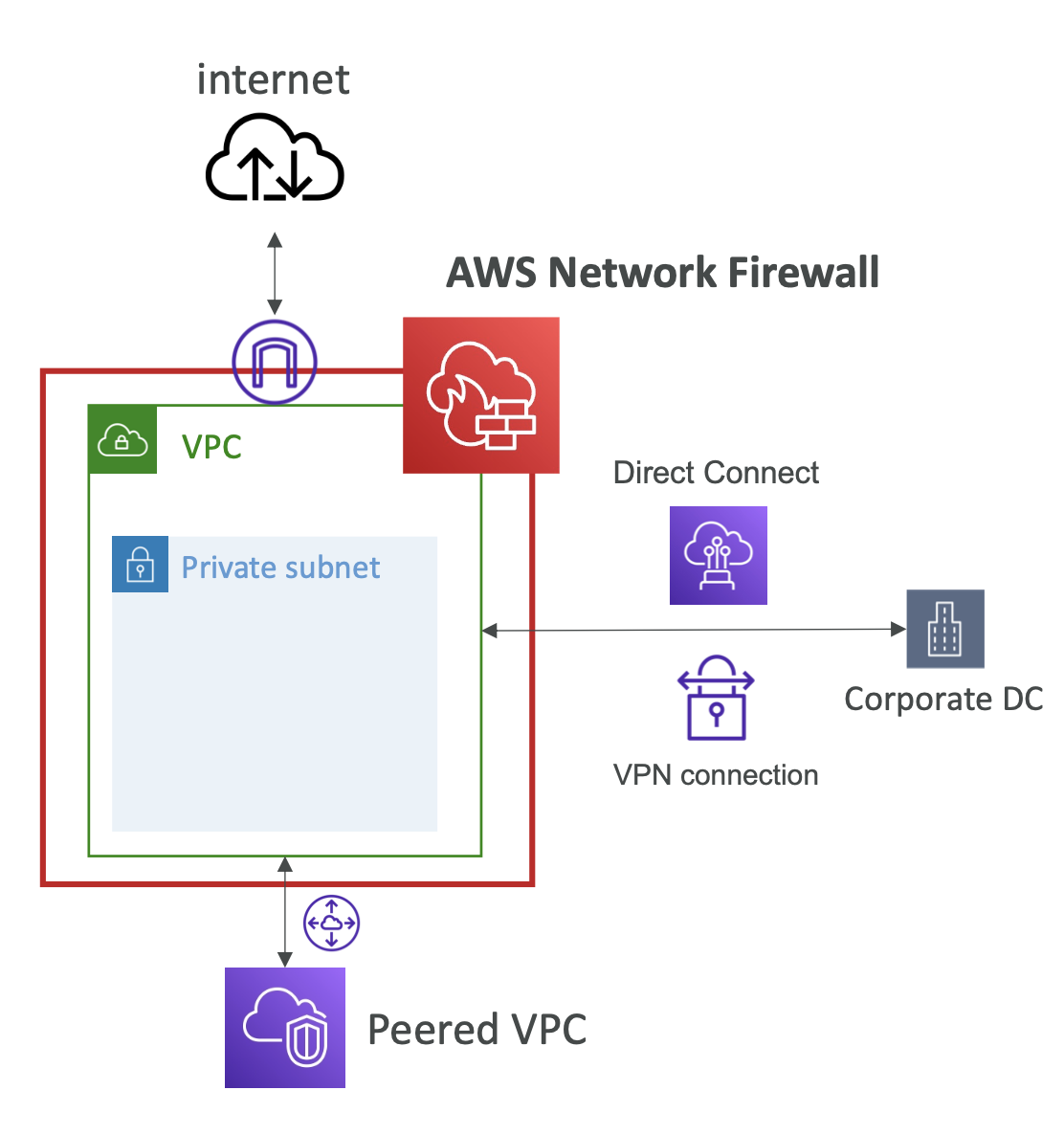
HTTPS로 암호화된 traffic도 AWS Network Firewall이 ACM 사용해서 복호화해서 검사할 수 있다.
Q) A Web Application hosted on EC2 instances in an Auto Scaling Group fronted by an Network Load Balancer. You have configured your application to use HTTPS by configuring ACM and an TLS Listener on the Network Load Balancer. To increase application security, you want to inspect traffic and do Deep Packet Inspection. Which of the following can you do to help achieve what you want?
A) Configure NLB with TLS Termination and use AWS Network Firewall
Q) You run a web application on several EC2 instances in an Auto Scaling Group fronted by Application Load Balancer. You are using a CloudFront distribution to help distribute your content to users around the world with low latency. When users are logged in, your application generates a JWT token stored in an Authorization header and authenticates requests at CloudFront. There is a requirement to forward the Authorization header to your EC2 instances. How could you configure your CloudFront distribution to forward the Authorization header to your origins?
A) Use CloudFront Cache Policy
- The main mechanism to forward specific headers, such as Authorization, in CloudFront is through cache policies. These policies specify which headers are included in the cache key and forwarded to the origin.
CloudFront Origin Request Policy는 Cache Policy에 추가로 어떤 동작이나 헤더 등을 설정하기 위함. 기본적인 처리는 Cache Policy로 처리하는게 맞다.
CloudWatch Synthetics란? 교재에 없는 서비스였음
- CloudWatch Synthetics is primarily used for simulating user traffic and testing the availability of your application from various locations. It helps you monitor the performance and uptime of your endpoints, but it does not provide real-time detection or alerts specifically for DDoS attacks.
부하테스트용 서비스인가
Q) Due to your company compliance requirements, all of your EC2 instances must be deployed in private subnet. There’s a requirement to manage those EC2 instances using Systems Manager Session Manager. What is the most secure way of doing this?
A) Install SSM Agent on EC2 instances and create 3 VPC Interface Endpoints ssm, ssmmessages, and ec2messages
위처럼 3개의 VPC Interface Endpoints를 만들어야 한다. ssmmessages, ec2messages는 처음보네.
ssm: Systems Manager의 일반 API 엔드포인트입니다. 인스턴스 등록, 명령/상태 같은 기본 제어 통신에 쓰입니다.ssmmessages: Amazon Message Gateway Service 엔드포인트로, Session Manager의 보안 데이터 채널과 Run Command 통신에 필요합니다. 실질적으로 세션 데이터가 오가는 쪽이라고 보면 됩니다.ec2messages: Amazon Message Delivery Service 엔드포인트입니다. 이것도 SSM Agent와 Systems Manager 사이 메시지 전달에 쓰였는데, AWS는 SSM Agent 3.3.40.0부터 가능하면ec2messages대신ssmmessages를 우선 사용한다고 설명합니다.
중요한 최신 포인트가 하나 있습니다.
2024년 이후에 출시된 AWS 리전에서는 ec2messages가 지원되지 않고, ssmmessages만 지원됩니다. 그래서 “무조건 3개의 VPC Interface Endpoint가 필요하다”는 설명은 리전에 따라 지금은 항상 맞는 말은 아닙니다. 오래된 리전에서는 3개를 같이 말하는 자료가 많지만, 최신 리전이면 ec2messages는 아예 대상이 아닐 수 있습니다.
그래서 이 문제를 실무적으로 해석하면:
- 전통적인 답안/시험 스타일:
ssm,ssmmessages,ec2messages용 Interface VPC Endpoint 생성 - 하지만 최신 AWS 기준으로 더 정확한 답:
리전에 따라- 구형 리전:
ssm+ssmmessages+ec2messages - 2024년 이후 신규 리전:
ssm+ssmmessages
- 구형 리전:
4. Identity and Access Management
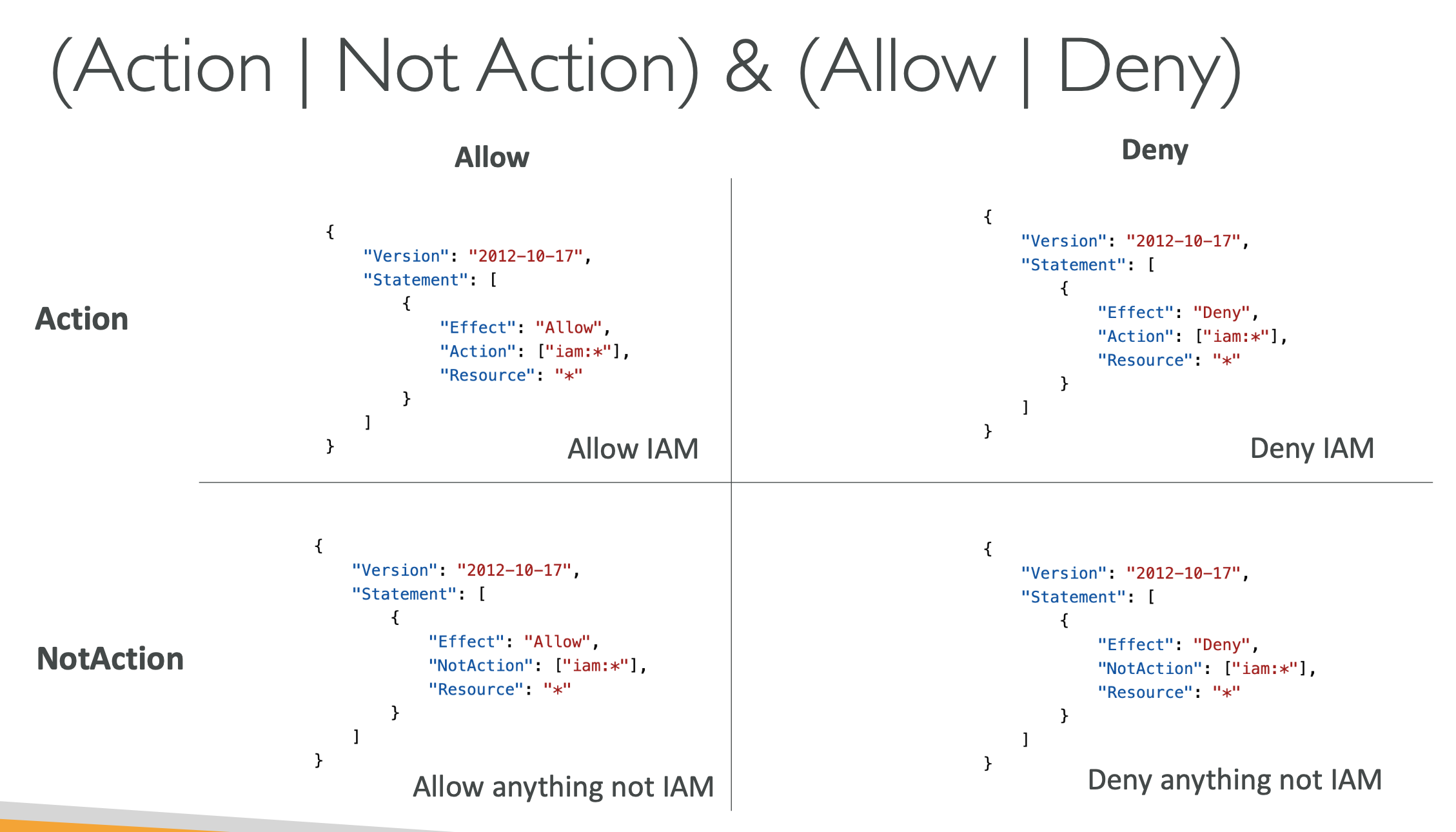
NotAction 헷갈리네.. NotAction에 명시된 리소스를 제외한 나머지 리소스에 대해 Allow/Deny가 적용된다.
허용은 명시적으로 해줘야 함.
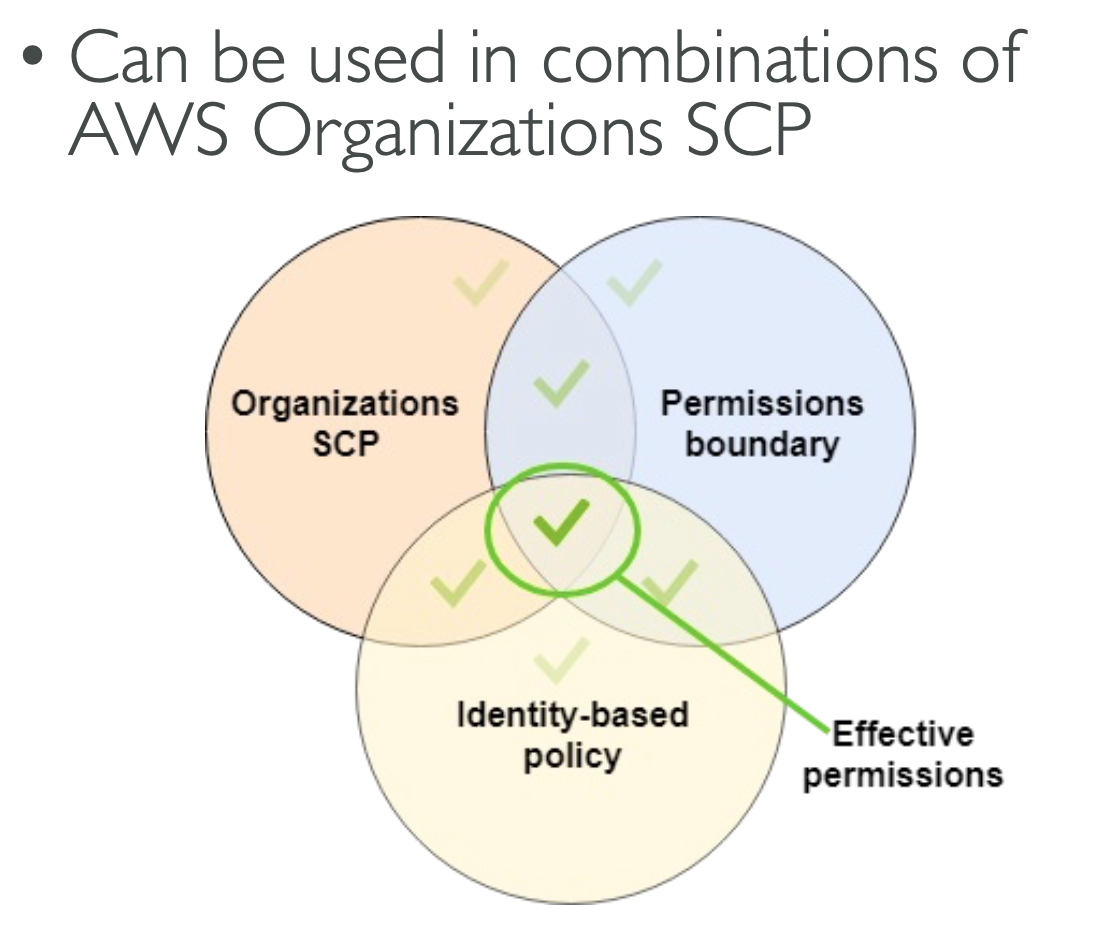
Permission Boundaries
- IAM Permission Boundaries are supported for users and roles (not groups)
Permission Boundaries가 선언되어 있으면 그 밖의 권한은 IAM Policy에 적혀있더라도 사용 불가
IAM Roles Anywhere
AWS 바깥에서 특정 role의 권한을 사용할 수 있음. 해당 role을 사용할 수 있는 임시 credential 발급해서 사용
On-premise에서 role 필요할 때 사용함
IAM Trust Policies
- Trust Policy defines who is allowed to assume an IAM Role
- Every IAM Role has:
- Trust Policy – defines who is allowed to assume this IAM Role
- Permission Policy – defines the permissions this IAM Role can do
IAM Security Tools
- IAM Credentials Report (account-level)
- a report that lists all your account’s users and the status of their various credentials
- IAM Access Advisor (user-level)
- Access advisor shows the service permissions granted to a user and when those services were last accessed.
- You can use this information to revise your policies.
AWS STS – Security Token Service
임시 토큰 발급 가능
Roles Anywhere랑 비슷한 것 같은데
- AWS STS
- AssumeRole, GetSessionToken 같은 API로 temporary credentials를 발급하는 서비스입니다.
- 주로 IAM role 전환, cross-account access, federation 같은 데 쓰입니다.
- IAM Roles Anywhere
- AWS 외부의 서버, 컨테이너, 애플리케이션이 AWS 자원에 접근할 때 쓰는 기능입니다.
- 이때 외부 워크로드는 X.509 인증서를 사용하고, AWS 쪽에는 그 인증서를 신뢰할 trust anchor와 profile을 설정합니다.
실무적으로 보면 이렇게 이해하면 가장 쉽습니다:
- STS: “임시 토큰 발급 엔진”
- Roles Anywhere: “온프레미스/외부 서버가 인증서 기반으로 그 엔진을 안전하게 쓰게 해주는 입구”
Granting Access to 3rd Party using External ID
IAM 정책에 sts:externalId 로 externalId 지정해놓으면 권한 요청할 때 미리 지정되어진 externalId를 포함하지 않은 요청은 거부된다.
EC2 Instance Metadata – Restrict Access
169.254.169.254 로 메타데이터 조회할 수 있음
OS의 firewall에서 접근 막아버리거나 AWS에서 Metadata Accessible 설정 변경해서 접근 못하게 할 수 있다
How Authorization Works in Amazon S3
- User Context
- Bucket Context
- Object Context
User → Bucket → Object
S3 Canned ACL
S3 Canned ACL은 Amazon S3가 미리 정의해 둔 ACL(Access Control List) 템플릿이에요.
즉, 권한을 개별 grantee별로 하나하나 적는 대신, x-amz-acl 헤더에 정해진 값 하나를 넣어서 버킷이나 객체의 접근 권한을 간단히 지정하는 방식입니다. AWS 문서에서도 canned ACL을 “predefined ACLs”라고 설명합니다.
예를 들면 이런 값들이 있습니다.
private: 기본값에 해당하며 소유자만 접근public-read: 모두에게 읽기 허용public-read-write: 모두에게 읽기/쓰기 허용authenticated-read: AWS 인증된 사용자에게 읽기 허용bucket-owner-readbucket-owner-full-control
이 중 실무에서 특히 많이 보이는 것은bucket-owner-full-control입니다. 다른 계정이 내 버킷에 객체를 업로드할 때, 버킷 소유자도 그 객체를 완전히 제어할 수 있게 만들 때 자주 씁니다.
예를 들어 CLI에서는 이렇게 씁니다.
aws s3 cp file.txt s3://my-bucket —acl bucket-owner-full-control
이렇게 하면 업로드 시 canned ACL이 함께 설정됩니다.
다만 지금은 중요한 전제가 있습니다.
AWS는 대부분의 현대적인 S3 사용 사례에서는 ACL이 굳이 필요 없고, 가능하면 Bucket Policy / IAM Policy 중심으로 권한을 관리하라고 권장합니다. 특히 S3 Object Ownership이 Bucket owner enforced 로 설정된 버킷에서는 ACL이 비활성화되어, ACL을 설정하려 하면 AccessControlListNotSupported 오류가 날 수 있습니다.
정리하면:
- Canned ACL = 미리 정해진 권한 묶음
- 업로드 시
--acl또는x-amz-acl로 간단히 적용 - 예전부터 많이 썼지만, 요즘은 ACL 대신 정책 기반 제어가 권장
- 그래도 교차 계정 업로드에서는
bucket-owner-full-control이 아직 자주 등장
Note: Deny statements in IAM policies do not affect the root account
S3 Access Point
S3 Bucket의 특정 path 이하에 대해서 access point를 설정해 버킷의 나머지 부분은 접근 못하는 access point를 생성할 수 있다.
S3 Multi-Region Access Points
가까운 곳에 라우팅되도록 Multi-Region access points 설정 가능 Active-Active, Active-Passive
Failover도 됨.
Cognito User Pools (CUP)
- Create a serverless database of user for your web & mobile apps
AWS IAM Identity Center (successor to AWS Single Sign-On)
SAML 2.0 대신 AWS IAM Identity Center 사용하면 됨.
여러 AWS 계정을 SSO로 로그인해서 사용할 수 있음
AWS Directory Services
- AWS Managed Microsoft AD
- AD Connector
- AD Connector is a directory gateway to redirect directory requests to your on-premises Microsoft Active Directory
- Simple AD
- Cannot be joined with on-premises AD
On-premise에 Active Directory가 있고, 이걸 여러 개의 AWS 계정과 연동하고 싶을 때는 AD Connector가 아니라 AWS Managed Directory를 생성하고 two-way forest 연결을 한다. AWS IAM Identity Center(=SSO)를 leverage해서 여러 개의 AWS 계정과 연동하기.
위 경우 AD Connector를 쓰지 못하는 이유:
- AD Connector의 역할과 제한
- AD Connector는 온프레미스 Active Directory에 대한 프록시 역할을 하여, AWS 서비스와 통합할 수 있게 해줍니다.
- 그러나, AD Connector는 단일 디렉터리만 연동 가능하며, 여러 AWS 계정에서 일관된 사용자 관리를 위해 설계된 것은 아닙니다.
- 두 계정간의 트러스트 의미와 필요성
- “Two-way forest trust”는 두 AD 간의 신뢰 관계를 의미하는데, 이는 주로 두 온프레미스 환경에서 Active Directory 간의 상호 신뢰가 필요할 때 사용됩니다.
- 해당 방식은 온프레미스 AD를 두 개 이상의 독립된 환경 또는 디렉터리와 연동하는 경우 유용하지만,
- AWS 환경에서 온프레미스 AD와 여러 AWS 계정을 중앙 집중식으로 관리하는 목적에는 적합하지 않습니다.
- 복잡성 및 효율성 문제
- 이 방법은 구성이 복잡하며, 트러스트 관계를 유지하고 관리하는 비용과 복잡도가 증가합니다.
- 특히, 여러 AWS 계정에 동일한 사용자들이 접근해야 하는 경우, 각각의 트러스트를 설정하고 유지하는 방식은 비효율적입니다.
- 대안과 비교
- AWS IAM Identity Center + managed directory + forest trust 방식은, 여러 계정에 쉽게 확장 가능하고 사용자 중앙관리의 이점을 누릴 수 있습니다.
- 대신, AD Connector와 forest trust의 조합은 특정 온프레미스 환경에서 두 개의 AD 간 복잡한 트러스트를 형성하는 데 더 적합하며, 광범위한 다계정 및 중앙화 관리라는 요구에는 적합하지 않습니다.
Solution Architecture: Active Directory Replication
- You may want to create a replica of your AD on EC2 in the cloud to minimize latency of in case DX or VPN goes down
- Establish trust between the AWS Managed Microsoft AD and EC2
Q) You are managing a company AWS Organization with multiple AWS accounts. You have been tasked to force all AWS accounts to only use EC2 Instance Metadata Service v2 (IMDSv2). What would you do to achieve this?
A) Attach an SCP to all AWS accounts with Condition Key “ec2:RoleDelivery”: “2.0”
여기서 SCP란 Service Control Policy. AWS Organizations에서 사용하는 정책입니다. 이를 통해 조직 내의 계정에 대해 허용하거나 제한할 수 있는 권한을 중앙에서 관리할 수 있습니다.
즉, SCP를 사용하면 조직 내 모든 계정에 일관된 보안 규칙을 적용할 수 있으며, 특정 서비스나 기능의 사용 여부를 제어하는 데 유용합니다. 예를 들어, EC2 인스턴스의 메타데이터 서비스 버전 사용을 강제하는 정책을 설정할 때 SCP를 활용하는 것이죠.
Q) You are managing an AWS account with 100s of IAM Users and 10 IAM Groups. You manage access to your AWS resources using IAM Roles and Policies attached to IAM Users and Groups. Every time you want to grant access to an AWS resource, you are required to edit the IAM Roles and Policies for each User or Group. What is the best way to manage such a case at scale?
A) Use Attribute-Based Access Control
“속성 기반 액세스 제어(Attribute-Based Access Control)“를 선택하셨는데, 이 방법은 사용자 속성(예: 부서, 역할, 위치 등)을 기반으로 액세스 권한을 동적으로 관리할 수 있어서 수많은 사용자와 그룹이 있을 때 매우 효율적입니다. 이를 통해 일일이 역할이나 정책을 개별적으로 수정하는 번거로움을 줄이고, 조건에 따라 자동으로 권한을 부여하거나 제한할 수 있어 확장성과 유지보수성 면에서 유리합니다.
Q) RBAC는 언제 쓰면 좋아? 문제에 뭐라고 나올 때 RBAC를 선택해야 답이 될까?
RBAC(역할 기반 액세스 제어)는 주로 다음과 같은 상황에서 적합합니다:
- 고정된 역할이 명확할 때: 조직 내 역할(예: 관리자, 개발자, 재무 담당자 등)이 명확하고 변경이 적을 때.
- 권한이 역할별로 잘 구분될 때: 서로 다른 역할별로 액세스 수준이나 권한이 뚜렷이 나뉘어 있을 때.
- 권한 부여와 관리를 일관되게 하고 싶을 때: 역할을 통해 권한을 중앙집중적으로 관리하여, 새로운 사용자에게 역할만 할당하면 권한이 자동으로 적용되는 구조를 원할 때.
문제에 어떤 선택이 나올 때 RBAC를 고려해야 할까?
- 특정 직무 또는 역할별로 권한이 구분되어 있어, “이 역할에 따른 권한만 부여한다”는 조건이 명확히 나올 때.
- “수많은 사용자에게 개별적으로 권한을 부여하는 대신 역할 기반으로 일괄 관리하는 것이 효율적이다”라는 내용이 언급될 때.
- 관리의 일관성과 규칙성을 강조하는 문제에서 “역할별로 권한을 하나의 집합으로 묶어서 관리한다”고 나오는 경우.
즉, 역할이 명확히 구분되어 있고, 권한이 역할별로 일관되게 관리되는 상황이 가장 적합한 조건입니다.
Q) You have an S3 bucket that you want to access privately from within a VPC and through a Direct Connect connection from your on-premises corporate data center. Which VPC Endpoint you’re going to use?
A) VPC Interface Endpoint
만약 문제에서 “여러 AWS 서비스에 대한 프라이빗 연결을 확장성 있게 지원하는 것이 목적”이라면, “VPC 인터페이스 엔드포인트”가 적합합니다. 반면, “단일 또는 특정 서비스(S3 또는 DynamoDB)“에 대한 간단한 프라이빗 연결이 목표라면, “VPC 게이트웨이 엔드포인트”가 더 적합합니다.
Q) You are managing a company with multiple AWS accounts. You have been tasked to force all S3 buckets in all AWS accounts to block public access and IAM Users can’t change that setting so data can’t be accidentally exposed. What would you do to achieve this?
A) Enable S3 Block Public Access setting at the Account Level
S3 Public Access 셋팅을 계정 수준에서 block할 수 있구나
Q) You are facing an issue where you generate STS Tokens and can’t use them with new AWS Regions (e.g., me-south-1). What should you do to solve this issue?
A) Use the Regional STS Endpoint for me-south-1 to generate STS Tokens v2
Global STS Endpoint는 v1을 지원한다. v2가 필요하면 regional STS endpoint를 사용해야 함.
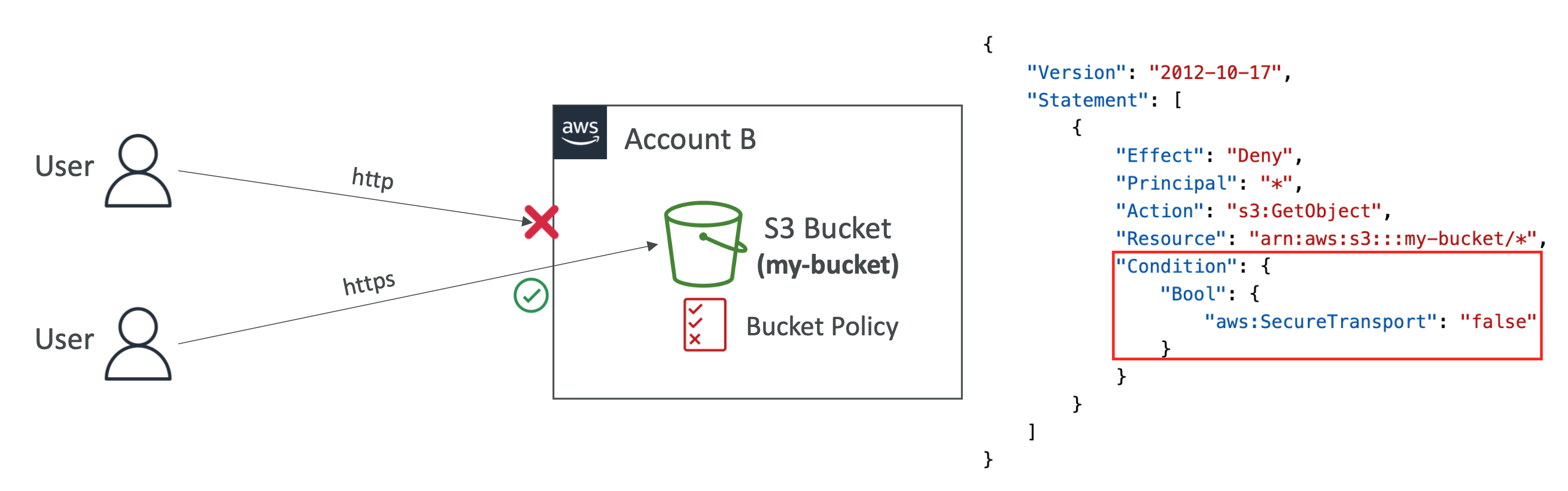
Q) Which IAM Policy Condition allows you to force only HTTPS requests to your S3 bucket?
A) aws:SecureTransport
이런 문제가 나오나… TransportSecure 아니고 SecureTransport가. ST가 알파벳 순이니까 그렇게 외우자.
5. Data Protection
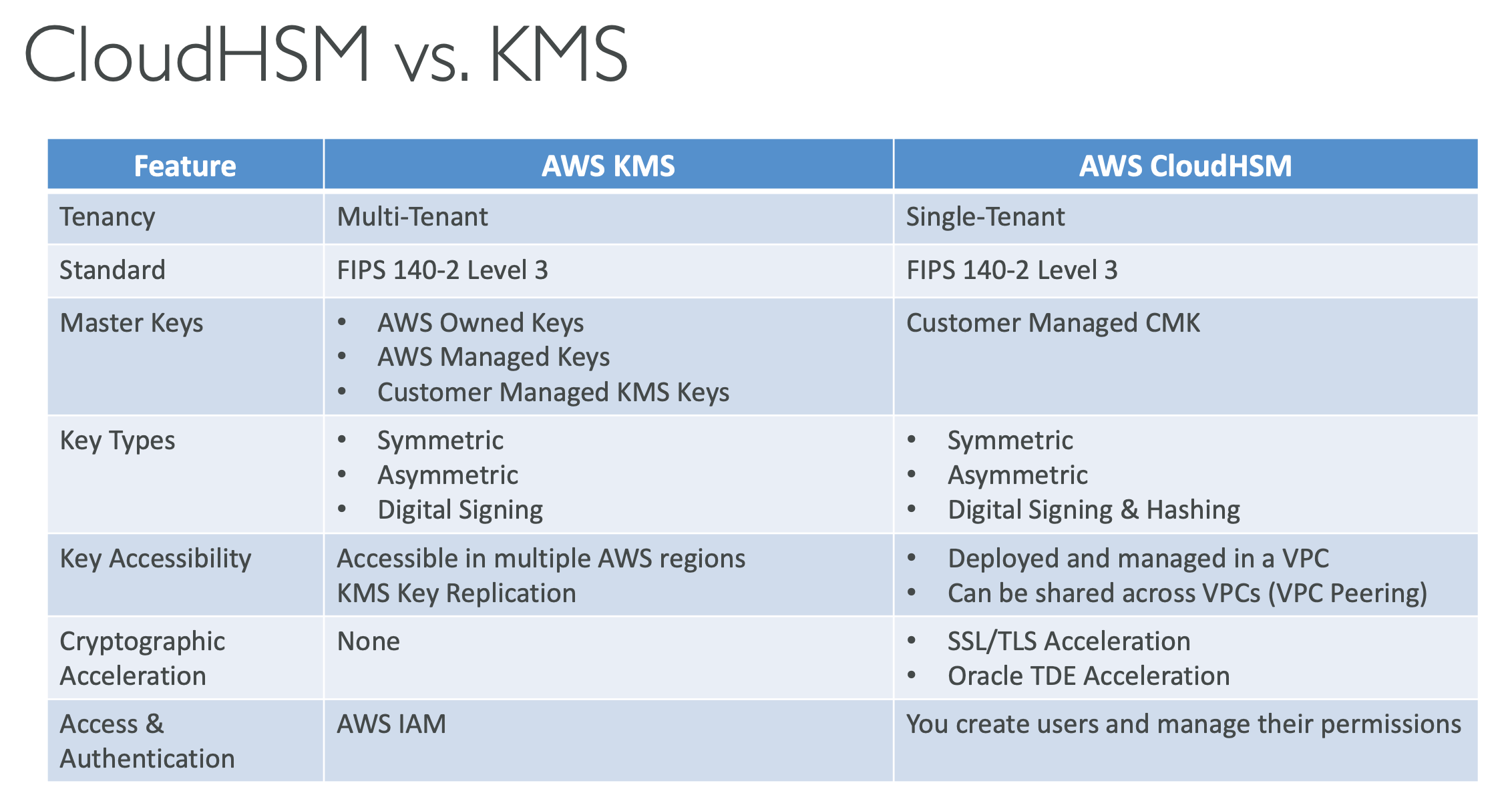
CloudHSM
- CloudHSM ⇒ AWS provisions encryption hardware
- Dedicated Hardware (HSM = Hardware Security Module)
- You manage your own encryption keys entirely (not AWS)
- Supports both symmetric and asymmetric encryption (SSL/TLS keys)
- Good option to use with SSE-C encryption

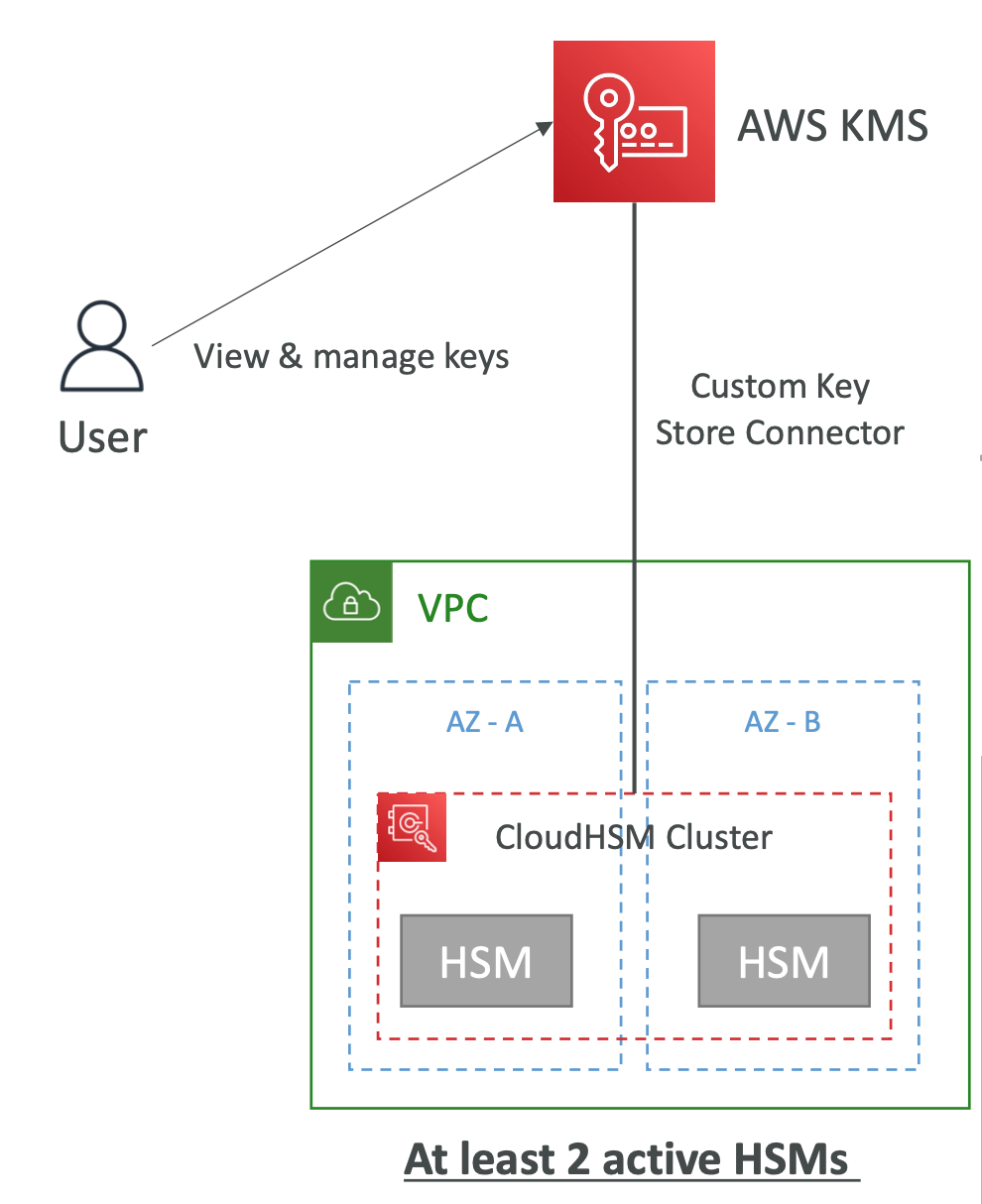
KMS Key Source – Custom Key Store (CloudHSM)
- Integrate KMS with CloudHSM cluster as a Custom Key Store
- Key materials are stored in a CloudHSM cluster that you own and manage
- The cryptographic operations are performed in the HSMs
- Use cases:
- You need direct control over the HSMs
- KMS keys needs to be stored in a dedicated HSMs
KMS Multi-Region Keys
같은 KMS key를 여러 region에서 사용할 수 있음. 하나의 region에서 생성한 뒤 다른 region에서 replica를 만들어서 사용한다.
- KMS Multi-Region are NOT global (Primary + Replicas)
Envelope Encryption
-
KMS Encrypt API call has a limit of 4 KB
-
If you want to encrypt >4 KB, we need to use Envelope Encryption
-
The main API that will help us is the GenerateDataKey API
kms:GenerateDataKey
-
For the exam: anything over 4 KB of data that needs to be encrypted must use the Envelope Encryption == GenerateDataKey API
먼저 용어부터 정리하면 이렇습니다.
- KMS key: 장기적으로 보관되는 상위 키입니다. 흔히 KEK(Key Encryption Key), wrapping key, root key 같은 역할로 이해합니다. 이 키는 주로 다른 키(DEK)를 암호화/복호화하는 데 쓰입니다.
- DEK(Data Encryption Key): 실제 데이터, 즉 파일/문자열/바이너리를 암호화하는 데 쓰는 키입니다. AWS 문서에서는 보통 그냥 data key라고 부릅니다.
- Encrypted DEK: DEK를 KMS key로 암호화한 결과물입니다.
GenerateDataKey응답의CiphertextBlob이 이것입니다. 이건 저장해도 됩니다. - Plaintext DEK: 실제 데이터 암호화에 잠깐 사용하는 평문 상태의 DEK입니다. 암호화/복호화 직후 메모리에서 지우는 것이 권장됩니다.
핵심 그림은 딱 이겁니다.
- 큰 파일 → DEK로 암호화
- DEK → KMS key로 암호화
- 저장할 때는 암호화된 파일 + 암호화된 DEK를 같이 저장
왜 이렇게 하느냐
KMS는 HSM 기반으로 동작하는 관리형 키 서비스라서, 매우 큰 파일을 통째로 직접 암호화하는 용도보다는 키를 안전하게 보호하고 짧은 암호 연산을 수행하는 용도에 가깝습니다. 실제로 KMS Encrypt는 대칭 키 기준 평문 4,096바이트까지만 직접 암호화할 수 있습니다. 그래서 큰 파일은 로컬이나 애플리케이션에서 대칭키로 암호화하고, 그 대칭키를 KMS가 보호하는 구조를 쓰는 겁니다.
(로컬에서 큰 파일을 암호화할 때는 Envelope Encryption 기능에서 제공하는 1회용 평문 암호키를 사용한다. 이 암호키는 대칭 암호이며 암호화 속도가 빠르다. 암호화가 완료되면 1회용 평문 암호키를 버리고 암호화된 암호키와 암호화된 파일을 같이 보관한다.)
암호화 순서
1) 먼저 KMS key를 하나 준비한다
이 키는 실제 파일을 직접 암호화하는 용도라기보다, DEK를 보호하는 상위 키입니다. 일반적으로 대칭 KMS key를 사용합니다. GenerateDataKey도 대칭 암호화 KMS key를 대상으로 사용합니다.
2) GenerateDataKey를 호출한다
이 단계가 가장 중요합니다. AWS KMS는 새로운 data key(DEK)를 생성하고, 그 결과를 두 가지 형태로 돌려줍니다.
Plaintext: 평문 상태의 DEKCiphertextBlob: 같은 DEK를 KMS key로 암호화한 값
즉, 한 번 호출하면 **“사용할 키”와 “보관할 키”**를 동시에 받는 셈입니다. AWS 문서도 이 DEK는 KMS key와 수학적으로 관련 없는 임의의 바이트라고 설명합니다.
3) Plaintext DEK로 큰 파일을 암호화한다
이제 실제 큰 파일은 AWS KMS 바깥에서, 애플리케이션이 평문 DEK를 사용해 대칭 암호화합니다. AWS 문서도 “plaintext data key를 사용해 AWS KMS 밖에서 데이터를 암호화하라”고 설명합니다. 서비스별 구현 예시로는 AES 기반 암호화를 사용합니다.
4) 평문 DEK는 바로 메모리에서 제거한다
평문 DEK는 가장 민감한 순간 키이므로 오래 들고 있으면 안 됩니다. AWS 문서도 데이터 암호화 후 plaintext key를 메모리에서 지우라고 안내합니다.
5) 저장할 때는 “암호화된 파일”과 “암호화된 DEK”를 함께 저장한다
여기서 많이 헷갈립니다. 저장해야 하는 것은 보통 아래 둘입니다.
- 암호화된 파일 본문
CiphertextBlob형태의 암호화된 DEK
AWS KMS 문서도 encrypted data key를 encrypted data와 함께 저장할 수 있다고 설명합니다. AWS Encryption SDK를 쓰면 이 작업을 SDK가 자동으로 해주고, encrypted data key를 암호문 메시지 안에 함께 넣어 줍니다.
복호화 순서
1) 저장된 “암호화된 파일”과 “암호화된 DEK”를 읽어온다
복호화하려면 파일 본문만 있어서는 안 되고, 그 파일을 암호화할 때 썼던 encrypted DEK도 필요합니다. AWS Encryption SDK를 썼다면 보통 메시지 헤더나 암호문 내부에 같이 들어 있습니다.
2) encrypted DEK를 KMS의 Decrypt로 복호화한다
CiphertextBlob을 KMS에 넘기면, KMS가 상위 KMS key로 이를 복호화해서 plaintext DEK를 돌려줍니다.
3) 돌려받은 plaintext DEK로 실제 파일을 복호화한다
이제 애플리케이션은 그 plaintext DEK를 써서 파일 본문을 원래 데이터로 되돌립니다. 즉, KMS가 직접 큰 파일을 복호화하는 것이 아니라, KMS는 DEK만 복호화하고 실제 파일 복호화는 애플리케이션이 수행합니다.
4) 복호화가 끝나면 plaintext DEK를 다시 메모리에서 제거한다
암호화 때와 마찬가지로, 복호화에 사용한 평문 DEK도 오래 보관하지 않는 것이 원칙입니다.
Envelope Encryption의 장점
첫째, 큰 파일도 효율적으로 처리할 수 있습니다. 실제 대용량 암호화는 빠른 대칭키로 하고, KMS는 작은 키만 보호하므로 구조가 효율적입니다.
둘째, 상위 키(KMS key) 보호가 강력합니다. KMS key는 AWS KMS 내부에서 보호되고, 애플리케이션은 직접 그 키 원문을 다루지 않습니다.
셋째, 키 관리가 쉬워집니다. 애플리케이션은 매번 새 data key를 받아 데이터를 암호화하고, 저장 시에는 encrypted data key만 보관하면 됩니다. AWS Encryption SDK를 쓰면 이 흐름이 더 자동화됩니다.
마지막으로, 헷갈리는 포인트만 다시 짚으면
- 큰 파일을 KMS key로 직접 암호화하는 게 아니다. KMS는 보통 DEK를 보호한다.
- DEK는 실제 데이터 암호화용 키다.
GenerateDataKey는 평문 DEK + 암호화된 DEK를 같이 준다.- 저장하는 것은 보통 암호화된 파일 + 암호화된 DEK다.
- 평문 DEK를 파일로 저장하면 안 된다. 잠깐 쓰고 메모리에서 지우는 쪽이 원칙이다.
- “DEK 파일”이라는 말은 보통 encrypted DEK를 담은 파일을 뜻하는 경우가 많다. AWS Encryption SDK를 쓰면 아예 암호문 내부에 포함될 수도 있다.
KMS Key Policies
- AWS Owned Keys
- You cannot view or change the Key Policy
- AWS Managed Keys (e.g., aws/ebs)
- You can view the Key Policy
- You cannot change the Key Policy
- AWS Customer Managed Keys
- You can view the Key Policy
- You can edit the Key Policy
KMS Grants
KMS Grant는 특정 KMS 키에 대해, 특정 주체(principal)에게, 필요한 작업만 따로 허용하는 “권한 위임 티켓” 같은 것입니다. AWS 공식 문서에서도 grant를 KMS 키 사용을 허용하는 정책 수단으로 설명하고, 권한 판단 시 key policy, IAM policy와 함께 고려된다고 안내합니다.
쉽게 말하면:
- Key policy: 이 키의 기본 권한 규칙
- IAM policy: 사용자/역할 쪽의 일반 권한 규칙
- Grant: 그중에서도 이 키에 한해서, 이 주체가, 이 작업만 하도록 주는 좀 더 좁고 실무적인 권한 위임
입니다. AWS는 key policy를 기본적인 권한 제어 수단으로 설명하고, grant는 그에 대한 대안/보완 수단으로 설명합니다.
예를 들어 grant에는 보통 이런 내용이 들어갑니다.
- 어떤 KMS 키에 대한 것인지
- 권한을 받는 grantee principal이 누구인지
- 허용할 작업 목록 (
Encrypt,Decrypt,GenerateDataKey,DescribeKey등) - 필요하면 retiring principal
- 필요하면 제약 조건(예: 특정 encryption context일 때만 허용)
왜 굳이 grant를 쓰냐면, 임시적이거나 서비스 연동용 권한에 잘 맞기 때문입니다. AWS 문서도 grant는 temporary permissions에 자주 쓰인다고 설명합니다. 즉, key policy 자체를 계속 수정하지 않고도 grant를 만들었다가 쓰고 지울 수 있습니다.
실무에서 자주 보는 패턴은 AWS 서비스가 사용자를 대신해서 grant를 만드는 경우입니다. 예를 들어 어떤 AWS 서비스가 네 customer managed KMS key를 써서 리소스를 암호화해야 할 때, 서비스가 네 대신 grant를 생성해서 그 키를 사용합니다. AWS 기본 key policy 설명에도 이런 용도가 나옵니다.
중요한 포인트만 정리하면 이렇습니다.
- Grant는 KMS 키에 붙는 권한 엔트리입니다.
- 특정 principal에게 암호화 관련 작업만 세밀하게 허용할 수 있습니다.
- 보통 짧게 쓰고 회수하기 쉬운 권한에 적합합니다.
- AWS 서비스 연동 시 자주 등장합니다.
- 최소 권한 원칙으로, 필요한 작업만 좁게 주는 것이 권장됩니다.
한 줄 비유로 말하면,
key policy가 건물 출입 규정이라면, grant는 “오늘 이 방에만 들어가서 이 작업만 하세요” 같은 임시 출입증에 가깝습니다.
KMS API Calls Limits & Data Key Caching
Data Key (DEK) 는 재사용하지 않는 걸 권장하지만, AWS KMS의 API Limit에 걸리는 경우라면 캐싱해서 사용하는 것도 괜찮다.
AWS Encryption SDK에 캐싱 기능이 구현되어 있음.
KMS – Encryption Context
암호화 할 때 붙일 수 있는 context. Encryption Context 자체는 암호화하지 않는다. 민감한 정보 여기에 넣으면 안 됨.
암호화된 데이터가 변조되지 않았는지 확인하는 용도로 사용 가능. checksum 같은거 넣나?
EBS Encryption – Account level setting
- New Amazon EBS volumes aren’t encrypted by default
- There’s an account-level setting to encrypt automatically new EBS volumes and Snapshots
- This setting needs to be enabled on a per-region basis
Encrypt Un-encrypted EFS File System
- You can’t encrypt an existing un-encrypted EFS File System
- Create a new encrypted EFS File System and migrate the files using AWS DataSync
Parameter Store, Secrets Manager는 대칭키만 사용한다
참고로 알아두기
Amazon S3 – Object Encryption
-
You can encrypt objects in S3 buckets using one of 4 methods
-
Server-Side Encryption (SSE)
- Server-Side Encryption with Amazon S3-Managed Keys (SSE-S3) – Enabled by Default
- Encrypts S3 objects using keys handled, managed, and owned by AWS
- Server-Side Encryption with KMS Keys stored in AWS KMS (SSE-KMS)
- Leverage AWS Key Management Service (AWS KMS) to manage encryption keys
- Server-Side Encryption with Customer-Provided Keys (SSE-C)
- When you want to manage your own encryption keys
- Server-Side Encryption with Amazon S3-Managed Keys (SSE-S3) – Enabled by Default
-
Client-Side Encryption
-
It’s important to understand which ones are for which situation for the exam
-
Glacier: all data is AES-256 encrypted, key under AWS control
Amazon S3 – Force Encryption in Transit aws:SecureTransport
Force HTTPS
S3 Object Lock (versioning must be enabled)
객체 삭제 안되게 lock 걸 수 있음..
Amazon S3 Glacier - Vault Policies & Vault Lock
Vault 내용물 변경 안 되게 락 걸 수 있음..
S3에서 삭제된 객체 복구해야 한다는 등의 문제 나오면 Versioning 써야 함
Versioning Enabled 된 상태여야 삭제된 객체 복구 가능
Amazon S3 – Replication (CRR & SRR)
-
Must enable Versioning in source and destination buckets
-
Cross-Region Replication (CRR)
-
Same-Region Replication (SRR)
-
Buckets can be in different AWS accounts
-
Copying is asynchronous
-
Must give proper IAM permissions to S3
-
Use cases:
- CRR – compliance, lower latency access, replication across accounts
- SRR – log aggregation, live replication between production and test accounts
-
There is no “chaining” of replication
- If bucket 1 has replication into bucket 2, which has replication into bucket 3
- Then objects created in bucket 1 are not replicated to bucket 3
Gateway Load Balancer
Gateway Load Balancer는 “애플리케이션으로 트래픽을 보내기 위한 로드밸런서”가 아니라, 네트워크 중간에서 트래픽을 가로채서 검사하는 가상 어플라이언스용 로드밸런서가 필요할 때 씁니다. AWS 공식 표현도 방화벽, IDS/IPS, DPI 같은 virtual appliance를 배포·확장·관리하는 용도라고 설명합니다. 또 GWLB는 OSI 3계층에서 동작하고, 모든 IP 패킷을 받아 대상 어플라이언스로 보내며, 어플라이언스와는 GENEVE(6081) 로 통신합니다.
가장 전형적인 사용 시점은 이런 경우예요.
여러 VPC 또는 여러 서브넷의 트래픽을 공통 보안 장비로 검사하고 싶을 때, 예를 들어 인터넷으로 나가거나 들어오는 트래픽, 또는 동서(East-West) 트래픽을 중앙의 방화벽/검사 장비 팜으로 보내고 싶을 때입니다. AWS의 GWLB 시작 가이드도 GWLB와 Gateway Load Balancer endpoint를 조합해, 서비스 소비자 VPC의 트래픽을 프라이빗하게 검사 VPC의 어플라이언스로 보내는 구조를 예시로 듭니다.
쉽게 말하면 이런 판단 기준입니다.
- ALB: HTTP/HTTPS 요청을 웹 애플리케이션으로 라우팅할 때 씁니다.
- NLB: 초고성능 L4 TCP/UDP/TLS 로드밸런싱이 필요할 때 씁니다.
- GWLB: 트래픽을 앱으로 보내기 전에 보안 장비/검사 장비를 반드시 통과시키고 싶을 때 씁니다.
Gateway Load Balancer는 ‘로드밸런서’라기보다, 방화벽/보안검사 장비를 네트워크 경로에 투명하게 삽입하고 확장하기 위한 서비스라고 이해하면 가장 정확합니다.
- 가능한 그림
외부 트래픽이 먼저 GWLB 뒤의 방화벽/IPS 어플라이언스를 통과하고, 검사 후 내부의 ALB로 가서 L7 라우팅을 하는 구조 - 불가능한 그림
GWLB의 target group에 ALB 자체를 등록하는 구조
예를 들면:
Internet → IGW ingress routing / GWLBE → GWLB → Firewall appliances → ALB → ECS/EC2
이런 식은 충분히 나올 수 있습니다. AWS의 centralized inbound inspection 문서도 GWLB 뒤의 방화벽 어플라이언스가 검사한 뒤 대상 VPC 인스턴스로 보낸다고 설명하고 있어, 그 대상 쪽에 ALB를 두는 설계 자체는 자연스럽습니다.
Network Load balancer – TLS Termination
NLB에서 복호화 한 뒤에 target에는 평문 http 를 보냄
Network Load balancer – TLS passthrough
NLB에서 TLS Listener를 사용하지 않고 암호화된 트래픽 그대로 target에 전달. target에서 알아서 복호화해서 사용하기. TCP Listener를 사용해야 한다.
mutual TLS authentication (mTLS)이 필요할 때도 TCP Listener를 사용해야 함.
ACM is a regional service
- To use with a global application (multiple ALB for example), you need to issue an SSL certificate in each region where you application is deployed. - You cannot copy certs across regions
AWS Private Certificate Authority (CA)
내 AWS 내부에서 사용하는 용도로 인증서 발급 가능.
-
Integrates with Amazon EKS with and any AWS service that is integrated with ACM
-
Use cases:
- Encrypted TLS communication, Cryptographically signing code
- Authenticate users, computers, API endpoints, and IoT devices
- Enterprise customers building a Public Key Infrastructure (PKI)
AWS Backup
- Fully managed service
- Centrally manage and automate backups across AWS services
- No need to create custom scripts and manual processes
- Supported services:
- Amazon EC2 / Amazon EBS
- Amazon S3
- Amazon RDS (all DBs engines) / Amazon Aurora / Amazon DynamoDB
- Amazon DocumentDB / Amazon Neptune
- Amazon EFS / Amazon FSx (Lustre & Windows File Server)
- AWS Storage Gateway (Volume Gateway)
- Supports cross-region backups
- Supports cross-account backups
AWS Nitro Enclaves
- Process highly sensitive data in an isolated compute environment
- Personally Identifiable Information (PII), healthcare, financial, …
- Fully isolated virtual machines, hardened, and highly constrained
- Not a container, not persistent storage, no interactive access, no external networking
- Use cases: securing private keys, processing credit cards, secure multi-party computation…
Q) Due to your company compliance requirements, you are only allowed to use KMS Keys with imported key material. You have been tasked to regularly delete the KMS Keys every 3 months. How can you delete a KMS Key with imported key material?
- You can’t delete it immediately, you can only schedule for deletion and the KMS Key will be deleted after 7 days
- You can’t delete it immediately but you can set an expiration period
- You can set an expiration period or delete immediately on-demand
3번이 답이다. ‘imported key material’이 있는 경우 즉시 삭제 가능.
7일 뒤 삭제는 일반 KMS Key에 해당함.
Q) Which of the following IAM Policy Condition Keys allows you to only allow KMS Key to be used only by a specific AWS service?
A) aws:ViaService
Q) A company uses AWS for hosting its infrastructure. AWS Organization is being used to manage multiple AWS accounts. There’s a requirement to host encryption keys in dedicated and compliant hardware, so a CloudHSM cluster has been created in the Security AWS account. For other AWS accounts to use the same CloudHSM cluster, you have been tasked to share the CloudHSM cluster with other AWS accounts in the AWS Organization. What should you do?
- Share the CloudHSM cluster using RAM
- Share the VPC that the CloudHSM cluster resides in using AWS RAM
- Create a VPC Endpoint Interface for CloudHSM
- Share the private subnets that the CloudHSM cluster resides in using AWS RAM
해설
- Share the CloudHSM cluster using RAM
- AWS Resource Access Manager (RAM)를 사용하여 특정 리소스를 공유할 수 있지만, CloudHSM 클러스터 자체를 직접 공유하는 방법은 없습니다.
- Share the VPC that the CloudHSM cluster resides in using AWS RAM
- VPC 전체를 공유하는 것은 가능하지만, 이는 CloudHSM 클러스터를 공유하는 목적에 부합하지 않으며, 보안성과 분리 요구 사항을 충족하지 못할 수 있습니다.
- Create a VPC Endpoint Interface for CloudHSM
- VPC Endpoint Interface는 AWS 서비스에 대한 프라이빗 연결을 제공하는 용도로 사용되며, CloudHSM 클러스터에 대한 접근 방법이 아닙니다.
- Share the private subnets that the CloudHSM cluster resides in using AWS RAM
- CloudHSM 클러스터는 일반적으로 VPC 내의 프라이빗 서브넷에 배치됩니다.
- AWS RAM을 통해 해당 VPC의 서브넷을 공유하면, 다른 AWS 계정에서도 같은 네트워크 내에서 CloudHSM에 접속할 수 있습니다.
Q) You are working for a data analytics company where you have 20 TB of data in the form of CSV files stored unencrypted in multiple S3 buckets. According to new compliance requirements, you have been tasked to encrypt those files using SSE-S3. What is the best and most efficient way to encrypt those files?
A) Use S3 Batch Operations
S3 설정을 바꾼다고 기존에 업로드된 파일이 자동으로 변경되지는 않는다. S3 Batch Operations 를 통해서 변환해줘야 함.
6. Security Foundations and Governance
SCP Hierarchy
Organization Unit이나 Account에 SCP(Service Control Policy) 할당 가능.
어떤 서비스를 사용하거나 사용 못 하게 할지.
명시적으로 allow 필요.
AWS Organizations – Reserved Instances
Org 내의 계정별로 RIs(Reserved Instances) and Savings Plans 공유가 켜져있어야 한다. 켜져있는 계정들끼리만 공유함.
AWS Control Tower
여러 계정 설정 자동화. AWS Organizations 위에서 작동함.
- Easy way to set up and govern a secure and compliant multi-account AWS environment based on best practices
- Benefits:
- Automate the set up of your environment in a few clicks
- Automate ongoing policy management using guardrails
- Detect policy violations and remediate them
- Monitor compliance through an interactive dashboard
- AWS Control Tower runs on top of AWS Organizations:
- It automatically sets up AWS Organizations to organize accounts and implement SCPs (Service Control Policies)
AWS Control Tower – Detect and Remediate Policy Violations
가드레일로 거버넌스 제공. SCP로 막고 AWS Config로 탐지함
- Guardrail
- Provides ongoing governance for your Control Tower environment (AWS Accounts)
- Preventive – using SCPs (e.g., Disallow Creation of Access Keys for the Root User)
- Detective – using AWS Config (e.g., Detect Whether MFA for the Root User is Enabled)
- Example: identify non-compliant resources (e.g., untagged resources)
AWS Config
자동으로 실행되면서 이런저런 보안 설정들 체크함
-
Helps with auditing and recording compliance of your AWS resources
-
Helps record configurations and changes over time
-
Questions that can be solved by AWS Config:
- Is there unrestricted SSH access to my security groups?
- Do my buckets have any public access?
- How has my ALB configuration changed over time?
-
You can receive alerts (SNS notifications) for any changes
-
AWS Config is a per-region service
-
Can be aggregated across regions and accounts
-
Possibility of storing the configuration data into S3 (analyzed by Athena)
-
AWS Config Rules does not prevent actions from happening (no deny)
AWS Config Remediation
규칙에 위배되는 설정을 보이면 자동으로 수정
AWS Config Notifications
올바르지 않은 설정 발견한 경우 EventBridge나 SNS에 이벤트 발행할 수 있음
AWS Config Aggregators
여러 계정의 AWS Config를 한꺼번에 관리 가능
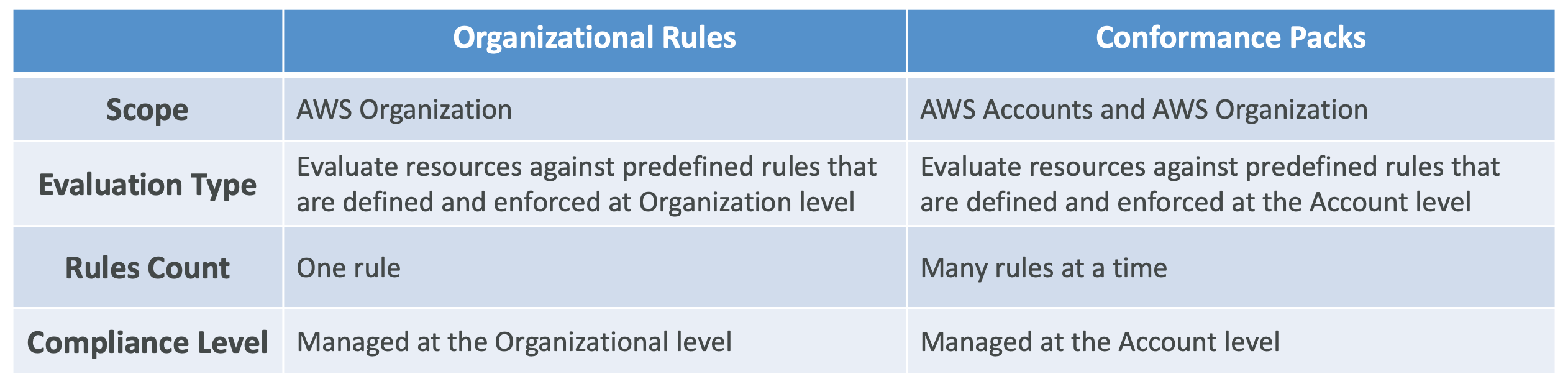
AWS Config – Organizational Rules vs. Conformance Packs
AWS Config – Use Cases
- Audit IAM Policies
- Detect if CloudTrail has been disabled
- Detect if EC2 instances are created with unapproved AMIs
- Detect if Security Groups are open to the public
- Detect if Internet Gateway is added to unauthorized VPC
- Detect if EBS volumes are encrypted
- Detect if RDS databases are public
Trusted Advisor
- No need to install anything – high level AWS account assessment
- Analyze your AWS accounts and provides recommendation on 6 categories:
- Cost optimization
- Performance
- Security
- Fault tolerance
- Service limits
- Operational Excellence
직접 변경은 안 하고 권장만 함
Cost Explorer
- Visualize, understand, and manage your AWS costs and usage over time
- Create custom reports that analyze cost and usage data.
- Analyze your data at a high level: total costs and usage across all accounts
- Or Monthly, hourly, resource level granularity
- Choose an optimal Savings Plan (to lower prices on your bill)
- Forecast usage up to 18 months based on previous usage
AWS Well-Architected Tool
-
Free tool to review your architectures against the 6 pillars Well-Architected Framework and adopt architectural best practices
-
How does it work?
- Select your workload and answer questions
- Review your answers against the 6 pillars
- Obtain advice: get videos and documentations, generate a report, see the results in a dashboard
AWS Acceptable Use Policy (AUP)
- Governs your use of the services offered by AWS
- You may not use for:
- Illegal or fraudulent activity
- Violate the rights of others
- Threaten, terrorism, violence, or other serious harm
- Child sexual abuse content or activity
- Violate the security, integrity or availability for other networks and computers
- Distribute, publish or facilitate the unsolicited mass emails (e.g., spams)
AWS Audit Manager
규제 잘 충족했는지 검사하는 서비스.
- Assess risk and compliance of your AWS workloads
- Continuously audit AWS services usage and prepare audits
- Prebuilt frameworks include:
- CIS AWS Foundations Benchmark v1.2.0 & v1.3.0
- General Data Protection Regulation (GDPR),
- Health Insurance Portability and Accountability Act (HIPAA)
- Payment Card Industry Data Security Standard (PCI DSS) v4.0
- CIS Controls v7.1
- Customize existing prebuilt frameworks or create your custom frameworks
- Generates reports of compliance alongside evidence folders
- Integrates with Security Hub, Config, Control Tower, CloudTrail, License Manager
- Run over multi-account via integration with AWS Organizations
CloudFormation – Service Role
CloudFormation을 통해서 리소스를 생성할 수는 있지만 유저가 직접 리소스를 생성할 수 있는 권한은 주고싶지 않을 때 Service Role 활용하면 됨
- User must have
iam:PassRolepermissions
CloudFormation Guard (cfn-guard)
cloudformation의 template이 organization policy guidelines에 위배되지 않았는지 확인하는 오픈소스 도구
- Can be used as part of CI/CD pipeline
AWS Service Catalog
조직 차원에서 이런저런거 이렇게저렇게 사용하라고 지정해놓을 수 있는 서비스인가
- Users that are new to AWS have too many options, and may create stacks that are not compliant / in line with the rest of the organization
- Some users just want a quick self-service portal to launch a set of authorized products pre-defined by admins
AWS Resource Access Manager (RAM)
다른 계정에게 리소스 공유할 때 편함
- Share AWS resources that you own with other AWS accounts
- Share with any account or within your Organization
- Avoid resource duplication!
- VPC Subnets:
- allow to have all the resources launched in the same subnets
- must be from the same AWS Organizations.
- Cannot share security groups and default VPC
- Participants can manage their own resources in there
- Participants can’t view, modify, delete resources that belong to other participants or the owner
- AWS Transit Gateway
- Route53 Resolver Rules
- License Manager Configurations
Q) AWS Resource Access Manager (RAM) 사용하면 하나의 VPC에 여러 계정의 리소스가 들어있게 설정할 수 있어?
A) 네, 어느 정도는 가능해요. 다만 정확히 말하면 “하나의 VPC를 여러 계정이 공동 소유”하는 건 아니고, VPC를 가진 계정이 AWS RAM으로 서브넷을 다른 계정에 공유해서, 그 다른 계정들이 자기 리소스를 그 VPC 안의 공유 서브넷에 생성하는 방식입니다. AWS는 이걸 VPC subnet sharing / shared VPC로 설명합니다.
즉, 결과적으로는 하나의 VPC 안에 여러 AWS 계정 소유의 리소스가 함께 존재할 수 있습니다. 예를 들어 참가 계정이 공유된 서브넷에 EC2, RDS, ECS, Lambda 같은 지원 리소스를 만들 수 있습니다. 다만 VPC 자체와 서브넷 자체의 소유자는 한 계정이고, 다른 계정은 그 안에 자기 애플리케이션 리소스를 배치하는 구조예요.
제약도 있습니다. 참가 계정은 공유 VPC에서 모든 네트워크 리소스를 다 만질 수 있는 게 아니라, 예를 들어 라우트 테이블, NACL, 인터넷 게이트웨이, NAT 게이트웨이, 서브넷 속성 변경, Transit Gateway attachment 같은 건 보통 VPC owner만 관리합니다. 반면 참가 계정은 자신이 만든 ENI, 일부 보안 그룹, 자기 애플리케이션 리소스를 관리합니다.
또 보통 이 방식은 AWS Organizations 안의 계정들 사이에서 사용합니다. 문서상으로도 owner와 participant 계정이 같은 AWS Organizations에 있어야 하고, RAM에서 organization sharing을 활성화해야 합니다. 기본 VPC의 서브넷은 공유할 수 없습니다.
한 줄로 정리하면, “RAM으로 하나의 VPC 안에 여러 계정의 리소스를 넣는 것”은 가능하지만, 그 방식은 VPC 전체 공유가 아니라 서브넷 공유 기반의 Shared VPC다라고 보면 됩니다.
(위에서 CloudHSM 공유할 때 이거 쓴듯)
AWS Fault Injection Simulator (FIS)
의도적인 장애를 발생하게 할 수 있음
AWS Resilience Hub
앱이 장애상황에 빠르게 복구될 수 있도록 설정을 돕는 도구
- Centrally manage and improve the resilience posture of your apps
- Define resilience goals, assess, and implement recommendations
- Define your app (CFN Stack, Resource Groups, Terraform, EKS Cluster)
- Set your targets: Recovery Time Objective (RTO) & Recovery Point Objective (RPO)
- Resilience Hub assess your app against AWS Well-Architected Framework
- Provides actionable recommendations: Standard Operating Procedures (SOPs)
- Standard Operating Procedures (SOP) – set of steps to recover your app in the event of an outage
- Provides Resilience Drift Detection to get notified when your app is no longer meets its resilience policy
- Integrates with AWS Fault Injection Service (FIS) to validate that the app recovers within the defined resilience targets
- Multi-account setup with AWS Organization and delegated administrators
설정 완료한 뒤에 AWS Fault Injection Simulator (FIS) 활용해서 테스트 가능
Q) Which AWS service allows you to continuously audit your AWS services usage and assess risk and compliance of your AWS workloads?
A) AWS Audit Manager
AWS Config는 왜 답이 아니야? → AWS Config는 리소스 구성을 계속 모니터링하고 기록하는 서비스입니다. 이를 통해 리소스 변경 사항과 규정 준수 상태를 추적할 수 있지만, 사용량 자체를 감사하거나 위험 평가를 수행하는 기능은 제공하지 않습니다. 따라서, 사용량과 위험 평가를 지속적으로 감시하고 감사하는 기능은 AWS Audit Manager가 담당하며, 이는 질문에 적합한 서비스입니다.
즉, AWS Config는 리소스 상태와 구성을 감사하는데 초점이 맞춰져 있으며, 사용량 평가와 위험 분석은 AWS Audit Manager가 담당하는 역할입니다.
Q) You are managing an AWS Organization with multiple AWS accounts. For all AWS accounts in the development OU, you have been tasked to allow users to create only EC2 instances of type t2.medium and deny the creation of any other EC2 instance type. What would you do to achieve this?
A) Attach an SCP to allow only t2.medium EC2 instances to the development OU
SCP에 t2.medium이 아닌 다른 타입을 모두 deny하는 정책을 붙이더라도, 명시적으로 t2.medium을 allow하지 않으면 t2.medium을 사용할 수 없다 (SCP의 정책 기본 원칙은 ‘명시된 것만 허용’임)
Q) t2.medium을 deny하는 정책 없이 t2.medium만 허용하는 정책만 OU에 붙여도 나머지 ec2 타입은 사용할 수 없게 되는거야?
네, 맞습니다.
Step-by-step 설명드리면:
-
허용 정책만 적용 시: — 예를 들어, SCP에 “allow” 정책만 붙이면, 그 정책에 명시된 EC2 인스턴스 타입(여기서는 t2.medium)만 허용됩니다. — 이 경우, 명시되지 않은 다른 타입은 기본적으로 허용되지 않습니다. 즉, 명시적으로 허용된
t2.medium만 사용할 수 있고, 다른 인스턴스 타입은 사용할 수 없게 됩니다. -
반대로, 차단(deny) 정책이 필요 없는 이유: — SCP는 정책의 기본 원칙이 “명시된 것만 허용” (whitelist 방식)입니다. 허용 정책만 있으면 명시되지 않은 항목들은 사용할 수 없습니다. — 그래서 “t2.medium” 만 허용하는 정책만 붙여도, 다른 타입은 사용할 수 없게 되며, 별도로 deny 정책이 필요하지 않습니다.
-
요약: — 네, “t2.medium” 만 허용하는 정책을 적용하면, 나머지 EC2 타입은 사용할 수 없습니다. — 이 방식이 가장 간단하고 명확한 해결책입니다.
7. Other Services
Lambda in VPC
- You must define the VPC ID, the Subnets and the Security Groups
- Lambda will create an ENI (Elastic Network Interface) in your subnets
- AWSLambdaVPCAccessExecutionRole
Lambda in VPC – Internet Access
- A Lambda function in your VPC does not have internet access
- Deploying a Lambda function in a public subnet does not give it internet access or a public IP
- Deploying a Lambda function in a private subnet gives it internet access if you have a NAT Gateway / Instance
- You can use VPC endpoints to privately access AWS services without a NAT
VPC에 연결된 Lambda는 public subnet에 붙여도 인터넷에 바로 나갈 수 없습니다. AWS 공식 문서에도 **“Connecting a function to a public subnet doesn’t give it internet access”**라고 명시돼 있습니다. 인터넷이 필요하면 보통 private subnet + NAT Gateway 구성이 필요합니다.
이유는 Lambda가 VPC 안에 붙을 때 사용하는 네트워크 인터페이스가 Lambda가 관리하는 Hyperplane ENI인데, 여기에 EC2처럼 퍼블릭 IP를 직접 붙여서 인터넷 게이트웨이로 나가는 방식이 아니기 때문입니다. 그래서 서브넷 라우팅만 public subnet처럼 되어 있어도 인터넷 접근이 자동으로 되지 않습니다. AWS도 Lambda를 VPC에 연결할 때 private subnet에 연결하라고 안내합니다.
정리하면 보통 이렇게 이해하면 됩니다.
- Lambda를 VPC에 연결하지 않음
→ 기본적으로 인터넷 outbound 가능 - Lambda를 VPC에 연결함 + public subnet 선택
→ 인터넷 안 됨 - Lambda를 VPC에 연결함 + private subnet 선택 + 0.0.0.0/0 → NAT Gateway
→ 인터넷 outbound 가능
추가로, 반드시 NAT Gateway만 가능한 것은 아닙니다.
인터넷 전체가 아니라 특정 AWS 서비스만 접근하면 된다면, NAT 없이 VPC Endpoint로 해결할 수 있습니다. 예를 들어 S3, DynamoDB, Secrets Manager 같은 서비스는 엔드포인트를 쓰면 사설 경로로 접근할 수 있습니다. AWS도 Lambda 인터넷 접근 문제 해결 문서와 관련 가이드에서 NAT 외에 이런 방식들을 함께 다룹니다.
Lambda – Function URL Security
- AuthType NONE – allow public and unauthenticated access
-
- Resource-based Policy is always in effect (must grant public access)
-
- AuthType AWS_IAM – IAM is used to authenticate and authorize requests
- Both Principal’s Identity-based Policy & Resource-based Policy are evaluated
- Principal must have lambda:InvokeFunctionUrl permissions
- lambda:InvokeFunction permission도 필요함
- Same account – Identity-based Policy OR Resource-based Policy as ALLOW
- Cross account – Identity-based Policy AND Resource Based Policy as ALLOW
AWS_IAM일 때의 권한 검증 방식은 아래와 같다.
일반적인 로그인 토큰(Bearer token) 검증이 아니라, 요청 자체를 AWS Signature Version 4(SigV4) 또는 SigV4a로 서명해서 보내는 방식으로 권한을 검증합니다. Lambda Function URL이 AWS_IAM이면, Lambda는 들어온 HTTP 요청의 서명을 다시 계산해서 비교하고, 서명이 유효하면 그 요청을 서명한 AWS principal 기준으로 IAM 정책 평가를 진행합니다.
즉, URL만 아는 것으로는 호출할 수 없고, 호출 시점에 요청에 서명 정보가 들어가야 합니다. 보통은 AWS SDK, AWS CLI, botocore, Postman의 AWS SigV4 기능 같은 도구가 이 서명을 자동으로 붙입니다.
헤더 기준으로 보면 보통 이런 것들이 들어갑니다.
Authorization: AWS4-HMAC-SHA256 Credential=<ACCESS_KEY_ID>/<DATE>/<REGION>/<SERVICE>/aws4_request, SignedHeaders=host;x-amz-date[;x-amz-security-token...], Signature=<calculated-signature>
x-amz-date: 20260416T080000Z
host: abcdefg.lambda-url.ap-northeast-2.on.aws
x-amz-security-token: <session-token>   # STS 임시 자격 증명일 때만
Authorization 헤더에는 알고리즘, credential scope, signed headers, signature가 들어가고, x-amz-date에는 UTC 타임스탬프가 들어갑니다. 임시 자격 증명(assume role 등)을 쓴다면 X-Amz-Security-Token도 넣어야 합니다. HTTP/1.1에서는 Host 헤더도 서명 대상에 포함됩니다.
검증 흐름은 대략 이렇습니다.
클라이언트가 액세스 키/시크릿 키(또는 임시 자격 증명)로 요청을 서명해서 보내면, AWS가 같은 방식으로 서명을 재계산해 비교합니다. 그 다음 서명에 사용된 principal이 누구인지 식별하고, 그 principal에게 lambda:InvokeFunctionUrl와 lambda:InvokeFunction 권한이 있는지, 그리고 함수의 resource-based policy 조건까지 만족하는지 평가합니다.
그래서 실무적으로는 헤더에 Bearer JWT를 넣는 구조가 아니라 Authorization: AWS4-HMAC-SHA256 ... 형태의 SigV4 서명 헤더를 넣는 구조라고 이해하시면 됩니다.
추가로, POST나 PUT처럼 바디가 있는 요청은 바디도 서명 계산에 포함됩니다. 특히 Lambda Function URL을 CloudFront OAC와 함께 쓸 때는 AWS 문서에서 x-amz-content-sha256 헤더에 요청 본문의 SHA-256 해시를 넣어야 하고, Lambda는 unsigned payload를 지원하지 않는다고 안내합니다.
한마디로 정리하면:
AuthType=AWS_IAM인 Function URL 호출은 “IAM principal이 가진 권한 + SigV4로 서명된 HTTP 요청” 둘 다 맞아야 통과합니다.
AWS Signer
AWS Lambda나 AWS IoT에 코드 배포할 때 특정 인증서로 서명된 코드만 배포하도록 강제할 수 있다.
- Fully managed Code-Signing service to ensure trust & integrity of your code
- Manages Code-Signing certificate public and private keys
- Code is validated against a digital signature to confirm that the code is unaltered and from a trusted publisher
- Code-Signing for AWS Lambda
- Digitally sign code packages for Lambda
- Enforce only trusted code runs in Lambda functions
- Not supported for Container Lambda functions
- Code-Signing for AWS IoT
- Sign code you create for AWS IoT and Amazon FreeRTOS
- Integrated with ACM to generate/import certificates
특정 signing profile이나 sign된 산출물을 revoke 할 수 있음
예를 들어 보면 더 쉽습니다.
- 보안팀이
prod-signer라는 signing profile로 Lambda zip들을 서명해 왔음 - 어느 날 그 프로필 관련 자격 증명이나 서명 체계에 문제가 생김
- 이때 보안팀은 둘 중 하나를 선택할 수 있음
- 특정 오염된 산출물만 문제면
RevokeSignature - 프로필 자체를 더 못 믿겠으면
RevokeSigningProfile
- 특정 오염된 산출물만 문제면
- 그 결과, 이후 그 서명/프로필을 사용하는 배포는 Lambda 서명 검사를 통과하지 못하거나 경고 대상이 됨
AWS Verified Access
VPN 없이 외부에서 안전하게 사내 리소스에 접근할 수 있게 해주는 서비스.. 신기하네
- Provide secure access to corporate applications without a VPN
- Remotely connect to your applications from any network
- Implement Zero Trust principles
- Go beyond network security: user identity, device security state…
- Fine-grained access for your applications
- Validates each application access request in real-time
- Authenticate users against IAM Identity Center or 3rd party OIDC IdP (e.g., Okta, CrownStrike…)
- Integrates with AWS WAF to prevent threats (e.g., SQL Injection, XSS…)
- Logs to Amazon S3, CloudWatch Logs, Kinesis Data Firehose, or 3rd party
AWS Glue
ETL 서비스
- Managed extract, transform, and load (ETL) service
- Useful to prepare and transform data for analytics
- Fully serverless service
Amazon WorkSpaces
VDI 대체 도구
- Managed Desktop as a Service (DaaS) solution to easily provision Windows or Linux desktops
- Great to eliminate management of on-premise VDI (Virtual Desktop Infrastructure)
- Fast and quickly scalable to thousands of users
- Secured data – integrates with KMS
- Pay-as-you-go service with monthly or hourly rates
IP나 인증서로 특정 사용자들만 접속할 수 있게 제한할 수 있다.
Auto Scaling – Instance Refresh
launch template 변경한 뒤에 EC2 인스턴스를 쉽게 재생성할 수 있게 해주는 도구
EBS Volumes – Data Wiping
사용 끝난 EBS를 새로운 유저에게 할당하기 전에 모두 0으로 덮어씌움.
따로 설정할 거 없다 자동이다.
AWS CloudShell
- Browser-based shell to manage your AWS resources
- Run AWS CLI commands & run scripts without leaving your browser
- Pre-installed common libraries and command-line tools:
- AWS CLI, ECS CLI, SAM CLI, and AWS SDKs for Python and Node.js
- Bash, Powershell, zsh, vi (editor), git, npm, pip, …
- Pre-configured AWS Credentials (inherit from the logged in user)
- Persistent storage with up to 1GB per AWS region
- Runs on Amazon Linux 2
- Can access resources in a VPC (EC2, RDS…) using VPC Environment
EC2 Image Builder
주기적으로 이미지 생성해주는 도구
베이스 이미지에 필요한 컴포넌트들 자동으로 설치해서 새로운 이미지 생성한다.
Amazon Redshift – Database Hierarchy
Superuser와 User가 나뉨. Superuser가 User 권한 관리 및 Group 생성해서 특정 테이블만 접근 가능하게 설정 가능
DynamoDB – Time To Live (TTL)
일정 시간 지난 뒤에 아이템 자동 삭제 가능
IAM Access Analyzer
한마디로 말하면, 내 AWS 리소스가 의도치 않게 외부나 다른 계정에 열려 있는지 찾아주는 권한 분석 서비스입니다. 예를 들어 S3 버킷, IAM 역할, KMS 키, Lambda, SQS 같은 리소스에 붙은 정책을 분석해서, 인터넷 전체(public) 나 다른 AWS 계정, 또는 조직 내부의 특정 주체가 접근 가능한 상태인지 탐지해 줍니다. AWS는 이를 자동 추론 기반 분석으로 설명합니다.
핵심 기능은 크게 3가지로 보면 됩니다.
첫째, access findings로 외부 접근, 내부 접근, 미사용 접근을 찾아줍니다. 둘째, policy validation으로 IAM 정책 문법 오류나 보안상 좋지 않은 패턴을 배포 전에 점검할 수 있습니다. 셋째, policy generation으로 CloudTrail 활동을 바탕으로 실제 사용한 권한만 반영한 더 좁은 IAM 정책을 생성해 최소 권한 설계에 도움을 줍니다.
실무적으로는 이런 데 많이 씁니다.
“이 S3 버킷이 외부 계정에 열렸나?”, “이 리소스에 우리 조직 안에서 누가 접근 가능한가?”, “이 역할에 너무 넓은 권한이 붙어 있나?” 같은 걸 점검할 때 유용합니다. 특히 최소 권한 원칙을 맞추는 데 도움이 됩니다.
주의할 점도 있어요.
IAM Access Analyzer는 기본적으로 정책을 분석해서 가능한 접근 경로를 찾아주는 서비스이지, 방화벽처럼 트래픽을 실시간 차단하는 서비스는 아닙니다. 즉 탐지·검증·정책 개선 지원 쪽에 가깝습니다. 또한 외부/내부 접근 분석은 지원 리소스의 resource-based policy 등을 중심으로 분석합니다.
헷갈리기 쉬운 게 하나 있는데,
이건 VPC의 네트워크 경로를 분석하는 Network Access Analyzer와는 다른 서비스예요. 지금 질문하신 “Access Analyzer”는 보통 IAM 권한/정책 분석 쪽을 뜻합니다.
Security Hub에 IAM Access Analyzer가 생성한 findings를 전송할 수 있음